
How to Build a Cold Email Lead List From Scratch for Free (No Paid Tools)
You don't need a paid data platform to build your first cold email lead list. In fact, for early-stage agency owners, manual list building often produces higher-quality, better-targeted leads than bulk data exports from Apollo or ZoomInfo. The tradeoff is time, but if you're starting out, time is what you have. Most agencies that spend $200-400/month on data tools in their first month end up with bloated lists full of outdated contacts, generic info@ addresses, and prospects who have zero relevance to their offer. Manual research forces you to be intentional about every single contact, and that intentionality shows up in your reply rates.
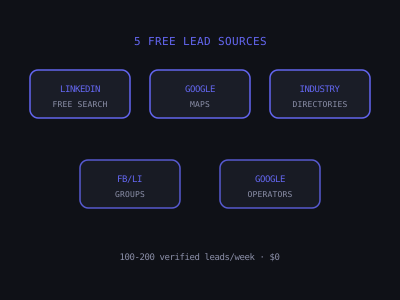
This guide covers five free methods for building a targeted cold email list from scratch: LinkedIn free search, Google Maps, industry directories, social media groups, and manual research. Each method includes the exact process, what data to collect, and how to find email addresses without paying for a data tool. By the end, you will have a repeatable system that can generate 100-200 verified leads per week at zero cost. Once your list is built, pair it with our guide on writing cold emails that actually get replies and make sure your sending domains are properly configured with our SPF, DKIM, and DMARC setup guide.
Free Lead List Building Methods, Contacts Per Hour
Relative speed, LinkedIn free search is fastest at 20-40 contacts/hr, Google operators slowest at 8-12/hr
What Makes a Good Cold Email Lead List
Before diving into the methods, understand what you're building toward. A high-quality cold email lead list has four characteristics:
- Verified decision-maker contact: You have the actual email address for the owner or decision-maker, not a generic info@ address. Sending to info@company.com drops your reply rate by 60-80% compared to a direct owner email. The person reading info@ is almost never the person who can say yes to your offer.
- Relevance to your offer: Every contact on the list has a plausible reason to need your service based on their industry, size, or business activity. If you sell AI automation for HVAC companies, a 3-person HVAC shop doing $200K in revenue is a poor fit. You want established businesses with 5-50 employees that are actively running marketing but losing leads due to slow follow-up.
- Sufficient context for personalization: You have enough information (name, company, city, niche, recent activity) to write a personalized first line. The difference between a 2% reply rate and a 15% reply rate often comes down to whether your first line references something specific about the prospect's business, a recent Google review, a service they offer, the city they operate in, or a pain point common to their niche.
- Verified email accuracy: Every email has been verified before sending to keep bounce rates below 3%. Sending to unverified lists is the fastest way to destroy your domain reputation. Once your domain gets flagged by Gmail or Outlook, every email you send, including legitimate business emails, starts landing in spam.
A common mistake is prioritizing list size over list quality. Fifty well-researched contacts with personalized first lines will outperform 500 generic contacts pulled from a bulk database every single time. When you are building your list manually, you naturally avoid this trap because the time investment per contact forces you to be selective.
Setting Up Your Lead List Spreadsheet
Before you start researching, set up a Google Sheet or Airtable base with the following columns. Having a consistent structure from the beginning saves hours of cleanup later and makes it easy to import your list into any email sending tool.
- First Name, The decision-maker's first name. Essential for email personalization.
- Last Name, Used for email pattern guessing (e.g., john.smith@company.com).
- Company Name, The business name as it appears on their website or Google listing.
- Company Website, The root domain (e.g., smithhvac.com). You need this for email finding tools.
- Email, The verified decision-maker email address.
- City / State, Location data for geographic personalization.
- Niche, Their industry or sub-niche (e.g., residential HVAC, cosmetic dentistry).
- LinkedIn URL, The decision-maker's LinkedIn profile link. Useful for follow-up research.
- Personalization Note, A one-sentence observation about their business that you can use in your email's first line. Examples: "Noticed you have 200+ Google reviews but no online booking on your site" or "Saw you recently expanded to a second location in Mesa." Once you have these notes, our cold email generator can turn them into full personalized first drafts.
- Verification Status, Valid, Invalid, Catch-All, or Pending. Only send to Valid addresses.
- Source, Where you found this lead (LinkedIn, Google Maps, directory, etc.). Tracking source helps you measure which method produces the best reply rates over time.
Method 1: LinkedIn Free Search
LinkedIn's free search is limited but functional for building small, highly targeted lists. Use the People search with filters for job title, location, and industry. LinkedIn's free tier limits you to 20-30 search results per search and restricts advanced filters, but with smart search query construction, you can work around these limits.
The process:
- Search for "Owner" OR "Founder" in the job title field combined with a specific city and industry keyword (e.g., "HVAC Owner Phoenix").
- Use Boolean operators: "(Owner OR Founder OR President) HVAC Phoenix" in the general search bar to get more specific results than the filter UI allows.
- For each result, note: full name, company name, company LinkedIn URL, and any public contact information in their profile.
- Use Hunter.io's free tier (25 free searches/month) to find the business email associated with their company domain.
- Store in a spreadsheet with columns: First Name, Last Name, Company, Company Website, Email, City, Niche, LinkedIn URL, Notes.
Advanced Boolean search strings that work on LinkedIn free: The key to getting value from LinkedIn's free tier is writing precise Boolean queries that narrow results before LinkedIn's commercial use limit kicks in. Here are proven combinations for common agency niches:
- HVAC: "(Owner OR Founder OR President) (HVAC OR 'heating and cooling' OR 'air conditioning') Phoenix"
- Dental: "(Owner OR 'Practice Owner' OR Dentist) (dental OR dentistry) Austin"
- Real estate: "(Broker OR 'Team Lead' OR 'Managing Partner') 'real estate' Dallas"
- Legal: "('Managing Partner' OR 'Founding Partner' OR Owner) ('law firm' OR 'legal') Chicago"
Working around the commercial use limit: LinkedIn's free tier shows a "You've reached the commercial use limit" message after roughly 100-150 profile views per month. To maximize what you get before hitting this cap, batch your research into focused sessions. Search one niche in one city per session, extract all the data you need in one pass, and avoid browsing profiles you do not plan to add to your list. Log out when you are done to stop passive profile views from counting against your limit. The limit resets on a rolling 30-day basis.
Realistic output: 20-40 verified contacts per hour using this method. Slower than Apollo, but significantly higher data accuracy and better personalization context.
Method 2: Google Maps for Local Business Targeting
For agencies targeting local service businesses (HVAC, dental, real estate, restaurants, gyms, etc.), Google Maps is one of the most efficient free lead sources available. Every business on Google Maps has a name, address, phone number, website, and often a owner-identifiable name in their Google Business Profile. Unlike LinkedIn, there is no usage cap, you can research as many businesses as you want.
The process:
- Search for your target niche in your target city: "HVAC company Phoenix" or "dental office Austin."
- For each business, note the company name, website, phone number, and any owner or contact name visible in the profile.
- Visit the company website to find the owner's name. Most local service business websites have an "About" page with the owner's photo and name.
- Use Hunter.io or Snov.io free tier to find the email format for their domain and guess the owner's email (firstname@domain.com or firstname.lastname@domain.com).
- Verify the guessed email using NeverBounce's free verification or the free tier of ZeroBounce.
Qualifying leads during research: Not every business on Google Maps is worth adding to your list. While you are researching, use these quick qualification filters to avoid wasting time on poor-fit prospects:
- Review count: Businesses with 50+ Google reviews are typically established enough to invest in outside services. Under 10 reviews often signals a brand-new or very small operation that does not have budget for your offer.
- Website quality: A business with a modern, professionally designed website is already investing in marketing and is more likely to understand the value of automation. A business with no website or a broken GoDaddy template is probably not spending on marketing at all.
- Service area: Businesses serving multiple cities or advertising specific high-value services (commercial HVAC, cosmetic dentistry, luxury real estate) typically have higher revenue and larger budgets.
- Paid ads: If you see a "Sponsored" tag next to their Google Maps listing, they are already running Google Ads. This is a strong signal they invest in lead generation and would be receptive to conversations about improving their lead follow-up.
Collecting personalization data from Google Maps: While you are on the listing, spend 30 seconds scanning their reviews for patterns. If multiple reviews mention long wait times for callbacks, that is a perfect personalization angle for an AI follow-up pitch. If reviews praise a specific team member, you can reference the quality of their team in your email. This takes an extra minute per lead but can double your reply rate.
Realistic output: 15-25 verified local business contacts per hour. High quality because you're researching each business individually, which also gives you excellent personalization material (review themes, services offered, geographic focus).
Method 3: Industry Directories and Associations
Almost every industry has one or more trade associations that maintain public directories of member businesses. These directories often include company name, owner name, location, website, and sometimes direct email addresses. The businesses listed are typically established, financially stable, and actively engaged in their industry, all signals of a qualified prospect.
Examples of directories to explore by niche:
- Home services: ACCA (Air Conditioning Contractors of America), PHCC (Plumbing-Heating-Cooling Contractors Association), NECA (National Electrical Contractors Association)
- Real estate: NAR (National Association of Realtors) member search, local MLS directories
- Legal: State bar association member directories (most are searchable by specialty and location)
- Dental/Medical: State dental association directories, ADA member finder
- Restaurant/Hospitality: National Restaurant Association, local Chamber of Commerce member directories
The process: Find the directory, search by location and specialization, export or manually record contact data, then use email finding tools to locate direct email addresses for decision-makers.
How to find niche directories you do not already know about: Use Google with the search query "[industry] association directory [state]" or "[industry] member list [city]." For example, "HVAC contractor association directory Arizona" will surface ACCA's Arizona chapter, the Arizona Registrar of Contractors license lookup, and regional contractor directories. Another approach: search "[industry] trade show exhibitors [year]" exhibitor lists from industry conferences are often published publicly and include company names, booth contacts, and websites for hundreds of businesses in your target niche.
Why directory leads convert well: Businesses that pay annual membership dues to a trade association are signaling that they take their business seriously. They attend industry events, follow best practices, and invest in professional development. These are exactly the types of businesses that have budget for outside services and are open to improving their operations. In our experience, leads sourced from industry directories have 20-30% higher reply rates than leads sourced from generic Google searches, likely because the qualification is built into the source itself.
Method 4: Facebook and LinkedIn Groups
Industry-specific Facebook groups and LinkedIn groups are populated almost exclusively by active business owners and practitioners who are engaged in their field. The members of a "HVAC Business Owners" Facebook group, for example, are exactly the people you want to reach.
The process (Facebook groups):
- Search Facebook for groups related to your target niche and request to join. Most industry groups accept new members quickly.
- In the Members section, browse the member list. Most member profiles show their name, job title, and company. Click through to profiles that match your ICP.
- From their profile or linked company page, find their website URL.
- Use Hunter.io or Snov.io to find their business email.
Finding the right groups: Search Facebook for "[niche] business owners," "[niche] entrepreneurs," or "[niche] professionals." Focus on groups with 1,000-10,000 members, large enough to have a substantial member list but small enough that members are genuinely active. Mega-groups with 50,000+ members tend to be flooded with spammers and vendors, making it harder to identify real business owners. On LinkedIn, search for groups using the same keywords and sort by activity level.
Mining group discussions for personalization: Beyond the member list itself, group discussions are a goldmine for understanding what your prospects care about. Spend 15 minutes reading recent posts in each group you join. Look for recurring complaints, common questions, and topics that generate the most engagement. If HVAC owners in a group repeatedly ask about how to handle after-hours calls, that tells you exactly what pain point to lead with in your cold email. Screenshot or note specific discussion themes, you can reference them in your outreach as proof that you understand their world.
LinkedIn group research: LinkedIn groups work similarly, but with an added benefit, member profiles on LinkedIn typically show more professional detail than Facebook profiles. You can see their company size, years in business, and whether they are actively posting content. Members who post frequently are more likely to respond to outreach because they are already comfortable with professional networking on the platform.
Note: Do not DM members in the group asking for their email, this is considered spam behavior in most groups and can get you banned. Use the group only for research, not outreach.
Method 5: Manual Research Using Google Search Operators
Google's advanced search operators let you find publicly available contact information for business owners without any tools. This is the slowest method but produces the highest data accuracy because you're reading primary sources.
Useful Google search operator combinations for lead research:
- site:linkedin.com "HVAC" "owner" "Phoenix", Finds LinkedIn profiles matching your criteria without needing to be logged into LinkedIn.
- "[niche] owner" "[city]" email, Sometimes surfaces business owner contact pages or About pages with direct email addresses.
- site:[targetdomain.com] "email" OR "contact", Searches a specific company's website for contact information.
- "[First Name] [Last Name]" "[Company]" email, When you know the owner's name from a directory, this often surfaces their direct email from conference bios, press mentions, or guest posts.
Additional operator combinations for deeper research:
- intitle:"about" "[niche]" "[city]" "founded", Surfaces About pages for businesses in your niche that mention founding details, which almost always include the owner's name.
- "[niche]" "[city]" filetype:pdf "contact", Finds PDF brochures, sponsor lists, and event programs that contain business owner contact details.
- site:yelp.com "[niche]" "[city]", Yelp business pages often link to the company website and show owner response activity, which helps you confirm the owner's name and assess engagement level.
Batch processing with Google search: The most efficient way to use this method is to pair it with a company list you have already built from Google Maps or a directory. Instead of using Google operators as your primary research tool, use them as a secondary step to fill in missing data. For example, if you have 20 company names from Google Maps but could not find the owner's email on 8 of them, run targeted Google operator searches for those 8 specific businesses. This hybrid approach gives you the speed of Google Maps research with the depth of manual Google search when you need it.
Free Email Finding Tools to Pair With These Methods
Once you have company names and owner names, you need to find the email addresses. These tools have generous free tiers:
- Hunter.io: 25 free searches/month. Domain search shows all indexed email addresses for a company domain. Email Finder finds specific person emails when you enter name and company domain. The domain search is particularly valuable because it reveals the email format pattern for a company (e.g., first.last@domain.com vs. first@domain.com), allowing you to construct emails for anyone at that company without using additional search credits.
- Snov.io: 50 free credits/month. Similar to Hunter, with slightly different coverage. Good as a backup for Hunter misses. Snov.io also includes a built-in email verifier in its free tier, so you can find and verify in the same tool.
- FindThatEmail: 50 free searches/month. Works well for smaller business domains that Hunter may not have indexed.
- RocketReach: 5 free lookups/month. More accurate than Hunter for some professional services niches but very limited free tier.
Email pattern guessing when tools return no results: For small local businesses, paid email finding tools often have no data. In these cases, use the email pattern revealed by Hunter's domain search on similar companies in the same niche, or try the most common patterns manually. The four most common email formats for small businesses are: firstname@domain.com (most common for local service businesses), firstname.lastname@domain.com, first initial + lastname@domain.com, and firstname + last initial@domain.com. Create all four variations for the owner's name and run them through a free email verifier. One of them will almost always come back as valid.
After finding email addresses with these tools, always verify them with NeverBounce or ZeroBounce before adding to your sending list. Both offer a small free tier for verification. Never skip verification, sending to even a small number of invalid addresses can trigger spam filters and damage your sender reputation for weeks.
Free Email Finding Tool Comparison, Monthly Free Credits
Bar length represents relative free tier generosity, combine all four for 130+ monthly lookups at zero cost
How to Verify Emails Without Paying for a Tool
Email verification is non-negotiable. Sending to unverified addresses is the single fastest way to land in spam and ruin your domain. Here is how to verify on a zero budget:
- NeverBounce free tier: Offers a small number of free single-email verifications each month. Use these for your highest-priority leads.
- ZeroBounce free tier: Provides 100 free monthly verifications, enough to verify a week's worth of manually built leads.
- Snov.io built-in verifier: If you are already using Snov.io's free tier for email finding, the verification is included in your 50 monthly credits.
- Manual MX record check: For technical users, you can verify whether a domain accepts email by checking its MX records using free tools like MXToolbox. This does not verify individual addresses but confirms the domain is set up to receive email.
What the verification results mean: Valid means the address exists and accepts mail, add it to your sending list. Invalid means the address does not exist, remove it immediately. Catch-All means the domain accepts all incoming email regardless of the address, so you cannot confirm the specific address exists, send to these cautiously and remove any that bounce. Disposable means the address is a temporary throwaway, remove it. Spam Trap means the address is monitored by anti-spam organizations, remove it immediately and never send to it under any circumstances.
Your verified list should have fewer than 3% invalid addresses. If your invalid rate is higher, your research sources may be outdated or your email pattern guessing needs refinement.
Building a Weekly Lead Research Routine
Consistency beats intensity when it comes to free lead list building. Rather than spending an entire Saturday building a massive list, establish a repeatable weekly routine that fits into 3-4 hours. Here is a sample schedule that produces 100-150 verified contacts per week:
- Monday (1 hour): Google Maps research, pick one city and one niche, work through the first 30-40 results, collect company names, websites, and owner names. Target: 20-25 raw leads.
- Tuesday (30 minutes): Email finding, run the previous day's company domains and owner names through Hunter.io and Snov.io. Guess patterns for any misses. Target: 15-20 email addresses found.
- Wednesday (1 hour): LinkedIn research, run Boolean searches for your target niche in 2-3 cities. Collect names, companies, and LinkedIn URLs. Target: 25-35 raw leads.
- Thursday (30 minutes): Email finding and verification, find emails for Wednesday's LinkedIn leads and verify the full week's batch through ZeroBounce or NeverBounce. Target: 20-25 verified and ready to send.
- Friday (30 minutes): Personalization pass, go through your verified list and write a one-sentence personalization note for each contact. Check their website, Google reviews, or LinkedIn profile for something specific to reference. Target: complete personalization for all verified leads.
This routine takes roughly 3.5 hours per week and produces a clean, personalized list of 100+ verified contacts. After four weeks, you will have 400-600 contacts, more than enough to sustain a healthy cold email campaign with daily sending.
How Many Free Leads Can You Build Per Week?
Realistically, a focused effort of 3-4 hours per week using these free methods can produce 100-200 verified, well-researched contacts. At a 10-15% reply rate with good email copy, that's 10-30 replies and 3-8 meeting bookings per week from a zero-budget lead generation process. To map your own list size and reply rate to expected meetings and revenue, run the numbers through our outreach ROI calculator.
To put that in revenue terms: if you close 20-30% of meetings booked (a reasonable rate for a well-positioned AI automation offer), 3-8 meetings per week translates to 1-2 new clients per week. At $1,500-3,000 per client for a starter automation package, that is $6,000-24,000 in monthly revenue generated entirely from free lead research. The math makes the time investment obvious.
When you're ready to scale beyond what free methods can produce, Apollo.io Professional at $99/month and Clay for AI enrichment become obvious investments. See our guide on how to use Apollo.io for local business outreach and how to pair it with AI personalization at scale for a fully automated lead generation system.
Want to learn how to build and sell AI automations? Kingstone AI Operators is our free community for AI automation agency builders. Join Kingstone AI Operators, free.
FAQ
Frequently Asked Questions
How do I build a cold email lead list for free without paid tools?
Use five free methods: LinkedIn free search with Boolean operators to find business owners, Google Maps to research local businesses and find owner names from About pages, industry trade directories (ACCA, NAR, state bar associations) for member data, Facebook and LinkedIn groups for prospect research, and Google search operators to find publicly available contact information. Pair with free tiers of Hunter.io (25 searches/month) and Snov.io (50 credits/month) for email finding.
How many free leads can I build per week for cold email outreach?
With 3-4 hours of focused effort per week using free methods, you can realistically build 100-200 verified, well-researched contacts. LinkedIn free search produces 20-40 verified contacts per hour. Google Maps research yields 15-25 local business contacts per hour. At a 10-15% reply rate with good email copy, that translates to 10-30 replies and 3-8 meeting bookings per week.
What is the best free tool to find business owner email addresses?
Hunter.io offers 25 free searches per month and is the best starting point, it finds email addresses from company domains and shows email format patterns. Snov.io provides 50 free credits per month as a good backup. FindThatEmail offers 50 free searches monthly. RocketReach gives 5 free lookups. Always verify found emails with NeverBounce or ZeroBounce free tier before adding to your sending list.
How do I use Google Maps to find leads for cold email campaigns?
Search for your target niche in your target city (e.g., 'HVAC company Phoenix'). For each business, note the company name, website, and phone number. Visit their website's About page to find the owner's name. Use Hunter.io to find the email format for their domain and construct the owner's email address. Verify with NeverBounce. This produces 15-25 high-quality local business contacts per hour.
Is it legal to build a cold email list from LinkedIn and Google Maps?
Collecting publicly available business contact information for B2B outreach is generally legal under CAN-SPAM in the US, provided you include a valid unsubscribe mechanism, your physical address, and honor opt-out requests immediately. However, scraping LinkedIn at scale violates their Terms of Service. Manual research (viewing profiles and noting information) is the safest approach. Always consult legal counsel for your specific situation.
How do I verify email addresses for free before sending cold emails?
NeverBounce and ZeroBounce both offer small free tiers for email verification. After finding email addresses through Hunter.io or manual research, run each address through a verification tool. Remove any addresses marked as Invalid, Catch-All, Disposable, or Spam Trap. Keep only Valid addresses. A clean list should show fewer than 3% undeliverable addresses to protect your sender reputation.
When should I upgrade from free lead list building to paid tools like Apollo?
Upgrade when free methods become the bottleneck, typically when you need more than 200 contacts per week or when the manual research time exceeds 8-10 hours weekly. Apollo Professional at $99/month gives you 1,000 email credits with advanced filters and CSV export. The ROI is clear: one closed deal from better-targeted outreach pays for months of Apollo subscription.
Program · 90 days
Client Accelerator bundles the demo software with live coaching.
A one-time $1,499 purchase, or 4 interest-free payments of $374.75. Includes Ciela AI with 150 personalized demos each month throughout the program, the 90-Day AI Client System, two live group coaching calls every week, sales and outreach templates, 200+ n8n workflow templates, and private Build With Adhiraj resources.
See what is includedCiela AI is the demo platform for AI agencies and AI consultants. It turns any prospect's website into a live, personalized AI demo (chat, voice, or missed-call text-back) you can send before the first call.
Start Client AcceleratorCiela AI pricingAgent builds by nicheAll articles
Community · Training
Join Build With Adhiraj free.
Build With Adhiraj is the free community for people building and growing AI service businesses. Learn alongside other operators as you package, demonstrate, sell, and deliver practical AI systems.
Join Build With Adhiraj free