
How to Create an AI-Powered CRM Workflow for Small Businesses Using n8n
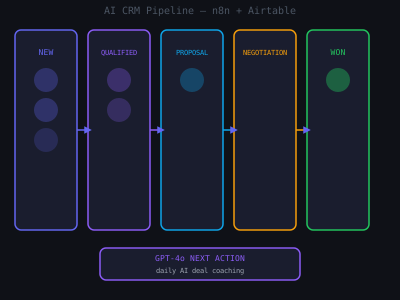
Most small businesses do not need Salesforce. They need something that works, does not require a dedicated admin, and actually helps them close more deals. An AI-powered CRM workflow built in n8n and Airtable does exactly that: it captures contacts automatically, tracks deal stages, sends follow-up reminders, and surfaces opportunities that would otherwise go cold. This is one of the highest-value automations you can sell to local businesses, and it justifies a $300 to $500 monthly retainer indefinitely.
Why Small Businesses Lose Deals Without Automation
Here is what actually happens at a typical small business: leads come in through five different channels, website forms, phone calls, referrals, LinkedIn DMs, and walk-ins. The owner follows up with maybe 60 percent of them. The other 40 percent fall into a black hole, and three months later a competitor closes the deal they missed. This is not a sales problem. It is a systems problem. The owner does not lack the motivation to follow up, they lack the infrastructure to remember.
The AI-powered workflow you are building flips this completely. The CRM updates itself. Follow-ups go out automatically. The owner receives a Monday morning briefing on what to focus on. The system does the remembering so they do not have to. When you frame the pitch this way, as solving the forgetting problem, not the technology problem, every small business owner with active leads will understand the value immediately.
Revenue Impact of Automated Follow-Up (Small Business Survey)
Step 1: Set Up the Airtable CRM Database
Use Airtable as the database layer. It is visual, easy for clients to use without training, and has a solid API for n8n integration. Create a base with three core tables: Contacts, Deals, and Activities. The Contacts table holds all lead and customer records. The Deals table tracks active opportunities with stage, value, close date, and next action fields. The Activities table logs every call, email, and meeting automatically.
One setup detail that matters: add a "Last Activity Date" formula field to the Deals table that pulls the most recent activity timestamp. This single field powers your stale deal detection and Monday morning report. Without it, every query has to join the Activities table, which slows down n8n workflows significantly. Also create two saved Airtable views: a Pipeline Kanban grouped by stage for the client, and a Stale Deals view filtered to deals with no activity in 7 or more days and stage not equal to Closed.
Step 2: Automate Contact Capture From Every Source
Build n8n workflows that capture contacts from all lead sources automatically. For website forms, use a webhook trigger that creates an Airtable record on submission. For email inquiries, use the Gmail trigger to parse inbound emails and extract contact data using GPT-4o. For phone calls, use a CallRail webhook that logs the caller and call details. Each trigger workflow includes a duplicate check: before creating a new contact, search Airtable by email first. If a match exists, update the record instead of creating a duplicate.
For Gmail parsing, use GPT-4o with a prompt like: "Extract the following from this email and return as JSON: name, email, phone (if mentioned), company (if mentioned), and a one-sentence summary of what they are asking about. If a field is not present, return null." This handles messy email formats far better than regex and produces clean, structured data for every inbound lead.
Step 3: Build Stage-Based Deal Automation
Add an n8n workflow that monitors Airtable for deal stage changes every 15 minutes. When a deal moves to a new stage, it triggers automated actions specific to that stage. A deal moving from New to Qualified triggers a discovery questionnaire email, a kickoff task in ClickUp, and a Slack notification to the owner. A deal moving to Proposal triggers a GPT-drafted proposal outline based on the deal notes and a 3-day follow-up reminder. Closed Won triggers the onboarding workflow and revenue tracking update. Closed Lost adds the contact to a 60-day re-engagement sequence.
Since Airtable does not have a native field-changed trigger, the cleanest approach is polling. Run a scheduled workflow every 15 minutes that fetches all deals modified in the last 15 minutes using the Last Modified Time field. Compare the current stage to a cached value stored in a secondary Airtable table called Deal Snapshots. Fire the stage-change logic when they differ and update the snapshot after processing.
Step 4: Add AI-Powered Next Action Suggestions
This is the feature that makes this CRM genuinely useful rather than just functional. Add a daily n8n workflow that runs at 7:00 AM and reviews all active deals. For each deal, it sends the deal history, contact details, current stage, last activity, and company context to GPT-4o with a prompt asking for the single most important action the owner should take today to move the deal forward. The response gets written back to the Next Action field in Airtable.
Make the prompt smarter by injecting the last three activities on each deal as context before sending to GPT. A deal where the last three activities are all unanswered emails should get a suggestion to try a different channel, not another email. GPT figures this out reliably when you give it the history. The output for a plumbing company might look like: "Call Marcus directly at 2 PM, you have sent three emails this week with no reply. Reference the recent storm damage on his street as a conversation opener." That is worth paying a retainer for.
Best-Fit Industries for This CRM Automation
Step 5: Build Automated Follow-Up Sequences
For each deal stage, build an automated email nurture sequence that triggers when a deal enters that stage and stops when the deal progresses or the contact replies. A New Lead sequence runs three touches over five days: introduction, value proposition, and case study. A Post-Proposal sequence runs two touches over three days: proposal summary and objection handler. A Stalled Deal sequence fires monthly for deals inactive for 21 or more days.
All email content is written by GPT-4o using the deal notes, company name, and industry for personalization. This produces emails that feel individually written even though they fire automatically. Reply detection is critical: after each email is sent, store the Gmail Message-ID in the deal record. A separate n8n workflow runs every 30 minutes, checks for replies, and cancels any pending sequence steps when a reply is detected. It also fires a Slack notification so the owner can respond immediately.
Step 6: Log All Activities Automatically
Manual activity logging is why CRMs fail, nobody wants to log every call and email. Automate everything. Gmail triggers log all outbound emails. CallRail webhooks log call duration and recording links. Cal.com triggers log every completed booking. After each call recording, OpenAI Whisper transcribes the audio and GPT summarizes it in three bullets: the prospect's main concern, what was agreed to, and the recommended next action. The owner can scan their entire call history without listening to recordings.
Step 7: Weekly Pipeline Report
Every Monday at 8:00 AM, an n8n workflow queries Airtable for all deal data and sends a GPT-written pipeline report to the business owner covering total pipeline value, deals by stage, deals won last week, deals at risk, and the top three priorities for the week. Deliver it as a formatted HTML email and also post a shorter version to their Slack sales channel if they use one.
The Monday report is the most visible output of the entire system. It is what the client sees first each week and what keeps them feeling the value of the retainer. Make it excellent. A real example for a plumbing company: "You have $47,500 in active pipeline across 8 deals. You closed one job last week worth $3,200. Three deals have had no activity in over a week. The highest priority is Westbrook Office Complex, their close date passed two weeks ago and the deal is worth $18,000. Call them today."
Selling This to Small Businesses
The pitch is simple: "You will never forget to follow up on a lead again, and you will know exactly where every deal stands every morning." Price the setup at $1,500 to $2,500 and monthly maintenance at $300 to $500. Use a concrete ROI calculation: ask how many leads they get per month and their average deal value. If they say 20 leads and $2,000 per deal, that is $40,000 in monthly opportunity. If 25 percent fall through because of slow follow-up, that is $10,000 per month in recoverable revenue. The system costs $300 per month. The math closes the deal. For more on how to structure the pitch, see how to build a demo that closes and 5-minute lead response automation.
Program · 90 days
Client Accelerator bundles the demo software with live coaching.
A one-time $1,499 purchase, or 4 interest-free payments of $374.75. Includes Ciela AI with 150 personalized demos each month throughout the program, the 90-Day AI Client System, two live group coaching calls every week, sales and outreach templates, 200+ n8n workflow templates, and private Build With Adhiraj resources.
See what is includedCiela AI is the demo platform for AI agencies and AI consultants. It turns any prospect's website into a live, personalized AI demo (chat, voice, or missed-call text-back) you can send before the first call.
Start Client AcceleratorCiela AI pricingAgent builds by nicheAll articles
Community · Training
Join Build With Adhiraj free.
Build With Adhiraj is the free community for people building and growing AI service businesses. Learn alongside other operators as you package, demonstrate, sell, and deliver practical AI systems.
Join Build With Adhiraj free