
How to Deliver AI Automation Without Coding: The Complete Agency Guide
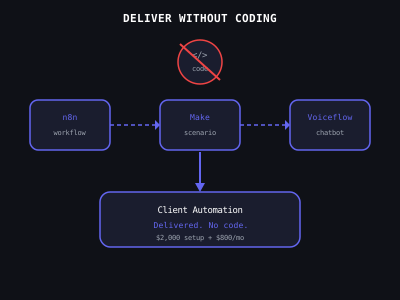
The no-code and low-code tool ecosystem has matured to the point where sophisticated AI automation projects can be built, delivered, and maintained without writing any code. Most successful AI automation agencies use visual workflow builders for 80 to 90 percent of their client work. The key skill is not coding, it is understanding client problems, scoping projects correctly, and delivering reliable solutions consistently. This guide walks through every aspect of code-free delivery: tool selection, project scoping, building, testing, and client communication.
The Minimum Viable No-Code Stack
Start with three tools before adding anything else. n8n for workflow automation, it is open-source, self-hostable at minimal cost, and has native AI and LLM nodes that make building AI-powered workflows straightforward without any API code. Make.com as your second workflow tool, easier to learn than n8n, better suited for simpler integrations and data-passing workflows, and the preferred starting point for many agency beginners because of its gentler learning curve. Voiceflow for chatbot and voice agent projects, a no-code conversation designer with white-labeling capabilities that lets you deploy client-facing AI agents without any backend code.
Most agencies use Make for simple integrations and n8n for anything requiring AI processing, complex logic, or high-volume data flows. Learning both is worth the investment. Projects that seem straightforward in Make sometimes hit limits that n8n handles natively, and being able to switch tools mid-project without rebuilding from scratch is a meaningful skill advantage.
No-Code Tool Selection by Project Type
Scoping Projects Without Technical Depth
Effective scoping is the non-technical skill that most determines whether a project is profitable. Before agreeing to build anything, work through five questions with the client: What is the trigger, the specific event that starts the automation? What are the resulting actions, exactly what should happen after the trigger fires? Which tools does the client already use, every app that needs to connect? Are n8n or Make integrations available for all of those tools? And how long will this actually take, with a 50 percent buffer added to the honest estimate?
The integration check is non-negotiable. Both n8n and Make have public integration libraries searchable in under two minutes. Check before committing. Discovering that a client uses a niche industry CRM with no connector after you have quoted the project is how agencies lose money. If an integration does not exist natively, you have three options: use the tool's API directly (requires basic HTTP knowledge), find a Zapier connection as a bridge (adds cost and complexity), or recommend the client switch to a supported tool. All three are valid, but the decision needs to happen before pricing, not during delivery.
Using Templates as Your Starting Point
Building from scratch is the slowest and most error-prone approach for every project below a certain complexity threshold. Both n8n and Make have extensive template libraries covering hundreds of common automation patterns. Browse the template library before designing a custom workflow. A template that covers 70 percent of what you need takes two to four hours to customize. A workflow built from scratch for the same use case takes eight to twelve hours.
The real skill is not building from scratch, it is identifying the right template, understanding what it does, customizing it for the client's specific tools and requirements, and testing thoroughly before handoff. That skill compounds directly into faster delivery, lower error rates, and more profitable projects over time.
Testing Before Every Client Handoff
Professional delivery means testing every scenario before the client sees it. The testing checklist: trigger the workflow with test data that exactly mirrors real client data (not simplified test data), verify the output in every connected app, test the error path (what happens when a required field is missing or a downstream app is unavailable), confirm SMS and email delivery on a real device, run the full flow end to end twice, and set up error monitoring so you receive immediate notification if anything breaks in production.
Error monitoring is something most beginners skip. In n8n, add an error workflow that fires when any node fails and sends you a Slack or email notification with the error details. This turns production issues from silent failures into immediate alerts. Clients notice when their automation stops working. You should notice first.
Agency Revenue Potential Without Coding
When You Will Eventually Encounter Code
Most agencies never need to go beyond the no-code layer, but there is a natural progression that many agency owners eventually follow. First comes copying and pasting code snippets from documentation when a node requires a custom expression. Then modifying small existing code blocks to change a variable or adjust logic. Then writing simple JavaScript functions in n8n's Code node for data transformation. Then hiring a developer for genuinely complex custom builds.
This progression happens naturally over six to twelve months of client work. You do not need to front-load programming knowledge, you will encounter the specific code situations you need to handle and can learn them in context, which is significantly faster than learning to code in the abstract. The vast majority of what clients need can be delivered with pure no-code for the first year of running an agency.
Building Your Delivery Process
Standardize your delivery process so every project follows the same phases: discovery (scope the project, confirm integrations, agree on success metrics), build (use templates as starting points, customize, build error monitoring from the start), test (full testing checklist before showing the client), handoff (live demo, documentation, training if needed), and retainer conversion (introduce the monthly program during handoff). A consistent process produces consistent results and makes it easier to bring on subcontractors as you grow. For more on the retainer conversation that should follow every delivery, see how to create recurring revenue with an AI automation agency and how to create SOPs for AI automation delivery.
Program · 90 days
Client Accelerator bundles the demo software with live coaching.
A one-time $1,499 purchase, or 4 interest-free payments of $374.75. Includes Ciela AI with 150 personalized demos each month throughout the program, the 90-Day AI Client System, two live group coaching calls every week, sales and outreach templates, 200+ n8n workflow templates, and private Build With Adhiraj resources.
See what is includedCiela AI is the demo platform for AI agencies and AI consultants. It turns any prospect's website into a live, personalized AI demo (chat, voice, or missed-call text-back) you can send before the first call.
Start Client AcceleratorCiela AI pricingAgent builds by nicheAll articles
Community · Training
Join Build With Adhiraj free.
Build With Adhiraj is the free community for people building and growing AI service businesses. Learn alongside other operators as you package, demonstrate, sell, and deliver practical AI systems.
Join Build With Adhiraj free