
How to Track and Report ROI for Your AI Automation Clients Every Month
The single biggest reason AI automation clients cancel is not that the system stopped working, it's that they stopped seeing the value. When a retainer renews every month and nobody is actively pointing to results, it starts to feel like an expense rather than an investment.
Monthly ROI reporting is how you prevent churn, justify renewals, and open the door to upsells. A client who receives a monthly report showing $18,000 in recovered revenue from a $1,500 retainer doesn't cancel. They ask you what else you can build.
This guide gives you the exact framework, templates, and data-pulling process for a monthly ROI report that retains clients and grows accounts.
The Core Principle: Report What the Client Cares About
Most agency reports are full of metrics that the agency cares about, uptime percentages, API call volumes, workflow execution counts. Clients don't care about any of that. They care about revenue, time, and outcomes.
Your report should answer three questions from the client's perspective:
- How much money did this make or save me this month?
- What would have happened if the system wasn't running?
- What are you improving next month?
Keep that lens on everything you include and remove anything that doesn't answer those questions.
The best way to internalize this: before you add any metric to a report, ask "so what does this mean in dollars?" If you can't answer that, don't include it. A HVAC company owner doesn't care that your n8n workflow ran 847 times. They care that 23 inbound leads got a response in under 90 seconds while the owner was on job sites, and 11 of those booked estimates.
Set Your Baseline Before You Launch Anything
You cannot show improvement if you don't know where the client started. Before you deploy a single automation, spend 20–30 minutes documenting the baseline state. This is one of the most important things you can do for long-term retention, and almost no agencies do it.
Ask the client these specific questions and write down the answers:
- How long does it typically take your team to respond to a new lead? (Be honest, weekend, after-hours.)
- Of the leads that come in, roughly what percentage do you actually follow up with?
- How many appointments are you booking per month right now?
- How many staff hours per week go toward manual follow-up, reminders, and intake?
- What is your average deal or job value?
- How many Google reviews have you received in the last 90 days?
Screenshot or export whatever data you can from their CRM and booking system before launch. Then save those numbers in a client file labeled "Baseline, [Month Year]." Every report you send for the life of the client will reference these numbers in the before/after column.
A concrete example: a plumbing client tells you their average first response time is "same day or next morning." You document that as 6–18 hours. After your missed call text-back system goes live, their average first response is 47 seconds. That delta, 6 hours down to 47 seconds, is the story your report tells every month.
The 5 Core Metrics to Track (By Automation Type)
Lead Response Automation
- Total leads responded to by AI (vs. total leads received)
- Average first response time (compare to your baseline before the system)
- Conversations initiated after hours (the "hidden team" metric)
- Appointments booked by AI (never by human involvement)
- Estimated revenue from AI-booked appointments (appointments × average deal value)
Follow-Up / Nurture Automation
- Leads re-engaged from cold status
- Response rate to automated follow-up sequences
- Conversions attributed to follow-up sequences
- Time saved on manual follow-up (hours per week × hourly rate)
Customer Support Automation
- Support requests resolved by AI without human intervention
- Average resolution time
- CSAT or satisfaction rating on AI conversations (if you have this)
- Support tickets deflected (preventing staff time costs)
Review and Reputation Automation
- Review request messages sent
- Review conversion rate (reviews generated ÷ requests sent)
- New reviews this month
- Average star rating change
Appointment Reminder and No-Show Prevention
This is an underreported metric that has massive dollar value for service businesses. Track:
- Reminder messages sent
- No-show rate before automation (from your baseline)
- No-show rate after automation
- Appointments saved (no-shows prevented × average deal value)
For a dental practice with a 15% no-show rate on 80 monthly appointments, bringing no-shows down to 5% recovers 8 appointments per month. At $350 average value per appointment, that's $2,800 per month in recovered revenue, from one reminder sequence. Put that number in the report.
How to Pull the Data (Without Spending Hours on It)
The practical challenge is getting the right numbers without spending hours digging through multiple platforms. Here's how to build an efficient data-pulling process:
Source 1: Your Automation Platform
n8n, Make, or Zapier all have execution logs. Export or screenshot monthly execution counts, error rates, and workflow-by-workflow summaries. This takes 5–10 minutes per client. In n8n, go to Executions and filter by date range and workflow. You can see exactly how many times each flow ran, which ones succeeded, and which ones had errors. Export that list and reference the headline numbers in your report.
Source 2: The Client's CRM
Pull: total new leads this month, leads tagged as "AI first contact," conversion rate for AI-contacted leads vs. total leads. Most CRMs can generate this in a saved custom report. Set it up once and pull monthly. In GoHighLevel, create a Smart List filtered by "Source contains AI" or whatever tag your workflow applies to AI-handled leads. Save the filter so you can run it in 30 seconds every month.
Source 3: Calendar Booking System
Pull appointment bookings by source. Bookings attributed to AI conversations are your clearest attribution metric. Count them and multiply by average deal value. Calendly, Acuity, and GHL Calendars all let you filter bookings by the landing page or source link used. If your AI sends a booking link from the chatbot, those bookings will have a distinct source you can isolate.
Source 4: Communication Platform
If you're using a tool like OpenPhone, Aircall, or Twilio for the AI SMS layer, pull message volume, conversation counts, and after-hours activity from their dashboard. Twilio's usage dashboard gives you message counts by date range by default. OpenPhone shows conversation-level data including time of day, which is useful for illustrating after-hours value.
Source 5: Review Platforms
Google Business Profile shows review count and rating history in the "Reviews" tab. Screenshot the current totals each month. The delta from baseline is your review automation output. If you're also monitoring Yelp or Facebook reviews, check those manually or use a tool like Birdeye or Podium if the client already has one.
Build an Automated Data Collection Pipeline
If you have more than 5 clients, manually pulling data from 4–5 sources per client every month is not sustainable. The solution is to automate the data collection itself using the same tools you use to build client automations.
Here's the architecture of a reporting pipeline built in n8n:
- Trigger: Schedule node fires on the 1st of each month
- Data pull nodes: HTTP Request nodes call each client's CRM API, calendar API, and Twilio API with a date range filter for the previous month
- Aggregation: A Code node or Set node combines all the raw data into a structured object with your key metrics
- Calculation node: Another Code node applies your ROI formula, multiplying appointment counts by deal value, hours saved by hourly rate, etc.
- AI narrative node: An OpenAI node takes the structured metrics as input and generates a 3-sentence plain-English executive summary using a prompt like: "You are an AI automation agency reporting results to a local business client. Based on the following metrics, write a concise executive summary highlighting the most impactful results. Metrics: [JSON]"
- Google Sheets update: Write the monthly metrics row to a tracking spreadsheet for the client
- PDF generation: Use an HTML-to-PDF node (Gotenberg or a similar service) to render a templated report populated with the month's data
- Email delivery: Send the PDF via Gmail or Mailgun to the client automatically
Setup time for this pipeline is 4–6 hours for the first client, then 30–60 minutes to clone and reconfigure for each subsequent client. Once running, monthly reporting requires zero manual work. The system runs itself and the client receives a polished report in their inbox on the 1st of every month.
The Monthly Report Template
Keep the report to 1–2 pages. Here's the structure:
- Header: Client name, reporting period, retainer amount
- Executive summary: 3 bullet points, the most important results in plain language
- Results this month: Your core metrics table with current month, previous month, and a trend indicator
- ROI calculation: Estimated revenue generated or saved ÷ retainer cost = ROI multiple
- Highlights: 1–2 specific moments worth calling out ("On Tuesday March 4th, the AI handled 14 simultaneous inquiries at 9pm while you were off")
- Issues resolved: Any problems that came up and how they were fixed
- Optimizations next month: What you're improving and why
For the design, keep it clean and branded with your agency colors. Use a simple two-column table for the metrics section with color-coded trend arrows (green up, red down). The goal is for the client to understand the results in 60 seconds of scanning, not to impress them with density.
One section worth spending more time on: the highlight moment. Find one specific, concrete story from the month's data. "On Saturday night at 11:43pm, a new lead submitted a contact form. Your AI responded in 38 seconds, answered 4 questions, and booked an estimate for Monday morning. You were asleep." That story does more to justify your retainer than any metric table.
The ROI Calculation Formula
Every report should include an explicit ROI calculation using this formula:
Monthly value generated = (AI-booked appointments × average deal value) + (staff hours saved × hourly rate) + (support tickets deflected × cost per ticket) + (no-shows prevented × average deal value)
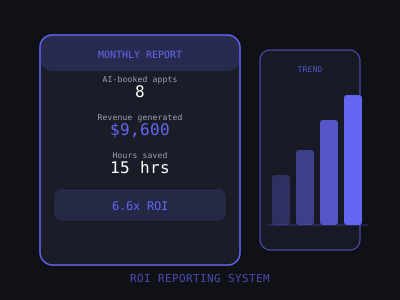
Example: 8 AI-booked appointments × $1,200 average deal value = $9,600. Plus 15 staff hours saved × $20/hour = $300. Total value: $9,900. Retainer cost: $1,500. ROI: 6.6x.
Present it plainly: "This month, your AI system generated an estimated $9,900 in value from a $1,500 investment, a 6.6x return."
A few important notes on the calculation:
- Be conservative. If the client only partially attributes a booking to AI (the human also followed up), count it at 50%. Underestimating builds credibility. The client can always argue the number is higher, that's a good conversation to have.
- Use the client's own numbers. Always base deal value on the figure the client gave you during onboarding, not an industry average. When the math is built on their data, it's harder to argue with.
- Show cumulative ROI. After month 3, add a cumulative line to the report: "Total value generated since launch: $31,400. Total invested: $4,500. Cumulative ROI: 6.9x." This number grows every month and becomes a powerful retention anchor.
For the full ROI calculation framework, including how to set baselines before launch, see our guide on how to calculate and present ROI for AI automation.
Real-World Example: HVAC Client Monthly Report
Here is what a real monthly report looks like for an HVAC company on a $1,200/month retainer, running a missed call text-back, lead nurture sequence, and appointment reminder system:
Executive Summary
- Your AI system responded to 34 inbound leads this month, 19 of those came in after hours or on weekends
- 9 new appointments were booked directly from AI conversations, without any staff involvement
- No-show rate dropped from 18% to 7%, recovering an estimated 4 additional service calls
Results Table
- Leads responded to: 34 (vs. 21 last month, vs. ~8 at baseline)
- Average first response time: 1.2 minutes (vs. 4.8 hours at baseline)
- After-hours leads handled: 19 (would have been missed or responded to next day)
- AI-booked appointments: 9
- No-show rate: 7% (baseline: 18%)
- New Google reviews: 6 (baseline was 1–2/month)
ROI Calculation
- 9 AI-booked appointments × $800 average job value = $7,200
- 4 no-shows prevented × $800 = $3,200
- 8 staff hours saved × $18/hr = $144
- Total estimated value: $10,544
- Retainer cost: $1,200
- ROI this month: 8.8x
This report takes about 20 minutes to populate and sends itself automatically. The client opened it, replied "this is incredible," and asked about adding the system to their second location the following week.
How to Deliver the Report
Format and delivery matter as much as the content. Here are three delivery options:
- PDF + Loom video (recommended): Send the PDF report with a 3–5 minute Loom walkthrough. The video personalizes the report and shows you care enough to explain it. Response rate to these is significantly higher than PDF alone. Keep the Loom to under 5 minutes, walk through the headline numbers, call out one highlight moment, and tease one optimization coming next month.
- Live monthly call: Review the report together on a 30-minute call. This is more time-intensive but builds the strongest relationships and is the best format for upsell conversations. Reserve this for your highest-value clients or any account where churn risk is elevated.
- Live dashboard (advanced): Build a real-time client dashboard in Databox, Google Data Studio, or similar. Clients can check in anytime. Best for clients who want high transparency. This is most valuable for clients with in-house operations staff who want to monitor the system daily.
Whichever method you use, send the report on a predictable schedule, same day of the month, every month. Predictability signals professionalism. When clients know they'll receive a report on the 3rd of each month, they start looking for it. That anticipation is the opposite of the anxious feeling clients get when they wonder if they've heard from their agency recently.
The Reporting Cadence: Weekly vs. Monthly
The reporting frequency should change based on where you are in the client relationship.
Days 1–60 (onboarding phase): Send a brief weekly update, not a full report, just a 5-bullet snapshot. Something like: "Week 2 update, 14 leads responded to, 3 appointments booked, system running smoothly. Full report coming on the 1st." This is critical in the early months when clients are still deciding whether the system is worth it. Weekly proof of activity prevents doubt from forming.
Months 3 and beyond (steady state): Switch to monthly detailed reports. If you have a client dashboard, mention it in your monthly email so they remember they can check in anytime. Add a one-line weekly text update if the client is high-touch: "Quick update, AI booked 2 appointments this week, system running well." Takes 30 seconds and keeps you top of mind.
The mistake most agencies make is doing intensive reporting at the start and then letting it taper off as other work takes over. Churn rate spikes in months 4–6 because that's when reporting frequency drops. Keep the cadence consistent and automate it so it doesn't depend on your memory.
Using Reports to Drive Upsells
Every monthly report is an upsell opportunity. When a client sees strong results, they're primed to ask what else is possible. The end of each report should include a one-line "what's next" teaser:
Example: "Based on this month's results, I see an opportunity to extend this system to your estimate follow-up process, potentially recovering another 6–10 jobs per month. Happy to walk you through the concept on our call."
Don't hard-pitch in the report. Plant the seed and let the strong results do the selling. The mechanics of the upsell conversation work like this: when you show a client they're getting 8x ROI, the framing for a new service becomes "if this new module generates even half the ROI the current system does, it pays for itself in the first week." That's an easy yes.
The best upsell triggers to watch for in your monthly data:
- High volume of after-hours leads being captured, opportunity to add a voice AI agent that can also answer and qualify callers, not just respond via text
- Strong appointment booking rate, opportunity to add a no-show prevention sequence if you haven't already, or an upsell sequence post-service
- Growing review count, opportunity to build a referral request automation that fires after a 5-star review
- Time saved metric is large, opportunity to propose a broader admin automation audit
See our guide on how to upsell clients on additional AI automations for the full playbook on expanding accounts without being pushy.
Common Reporting Mistakes to Avoid
Most agencies that lose clients over reporting issues make one of these four mistakes:
1. Reporting vanity metrics instead of outcomes. Workflow execution counts, uptime stats, and API call volumes feel impressive to you because you understand what they mean. The client doesn't. Everything gets translated to revenue, time, or a business outcome before it goes in the report.
2. Skipping months when results are weak. If a month had poor results because of a system issue or external factors, send the report anyway and explain it clearly. "Lead volume was down 40% this month because Google changed your local pack ranking, your AI responded to every lead that came in, but fewer leads came in. We're monitoring and here's what we're doing." Silence is always worse than a bad report with context. Clients who feel left in the dark cancel.
3. Overpromising the numbers. If you round up or use optimistic assumptions in your ROI calculation, a client who runs the numbers themselves will catch it and lose trust in everything you report. Be conservative. Use "estimated" and "based on your average deal value" language. Credibility compounds over time.
4. Making reporting manual and dependent on you personally. The moment your reporting process requires you to remember to do it, it will become inconsistent. Build the automated pipeline in your first 60 days with a new client. Manual reporting doesn't scale past 5 clients.
The 30-Minute Monthly Reporting Process
Once your data sources are set up, monthly reporting should take no more than 30 minutes per client. Here's the workflow:
- Minutes 1–10: Pull data from all sources (automation logs, CRM, calendar, comms platform)
- Minutes 11–20: Fill in the report template with current month numbers and run the ROI calculation
- Minutes 21–25: Write the executive summary, highlight moment, and next month's optimization note
- Minutes 26–30: Record 3-minute Loom walkthrough and send with PDF
The first time you do this for a client it'll take 60–90 minutes. By month 3, you'll be at 25 minutes. Track your time per client, it's a key input for your capacity model when you're deciding how many clients you can take on.
Once you build the automated pipeline described above, those 30 minutes drop to 5–10 minutes of review before the system sends itself. At scale, that's the difference between spending 4 hours a month on reporting for 8 clients vs. 40 minutes reviewing auto-generated reports before they go out.
Reporting is not the glamorous part of running an AI automation agency, but it is one of the highest-leverage activities you can do for retention. A client who sees their ROI every month for 12 straight months is not thinking about canceling. They are thinking about what else you can build them.
Want to learn how to build and sell AI automations? Kingstone AI Operators is our free community for AI automation agency builders. Join Kingstone AI Operators, free.
FAQ
Frequently Asked Questions
How do I track ROI for AI automation clients?
Measure five core metrics before and after automation: lead response time, total leads responded to, appointments booked, no-shows prevented, and reviews generated. Convert each metric to a dollar value using the client's average customer value. Present monthly reports showing cumulative ROI since launch. Automate data collection using n8n or Make to pull from CRMs, calendars, and messaging platforms.
What should an AI automation client report include?
Include headline ROI (monthly recovered revenue vs. service cost), key metrics with before-and-after comparisons, a summary of automation activity (leads responded to, appointments booked, reviews generated), any issues resolved, and planned optimizations for the next month. Keep it to one page with visuals. Use AI to generate a plain-English narrative summary that highlights the most impactful results.
How often should I send ROI reports to AI automation clients?
Send weekly summary reports during the first 60 days to demonstrate value quickly. After the relationship is established, switch to monthly detailed reports with a brief weekly metric snapshot. Automate the entire process, manual reporting doesn't scale and creates inconsistency that leads to client churn.
How do I calculate ROI for AI automation services?
Use the formula: ROI = (Value Generated - Service Cost) / Service Cost x 100. Value generated includes recovered revenue from faster lead response, saved labor costs from automated tasks, additional revenue from reactivated customers, and indirect value from reviews and referrals. Always use conservative estimates and let clients verify the numbers against their own records.
How does ROI reporting reduce client churn for AI agencies?
Clients churn when they forget why they're paying you. Consistent ROI reporting keeps your value visible without requiring check-in calls. When a client sees concrete numbers every week, leads captured, revenue recovered, time saved, they never question whether the service is worth the monthly fee. Agencies with automated reporting systems see 30-50% lower churn than those that rely on ad-hoc communication.
What tools can I use to automate ROI tracking and reporting?
Use n8n or Make to build automated data pipelines that pull metrics from your client's CRM, calendar, messaging platform, and review sites. Aggregate data in Google Sheets or Airtable, use an AI node to generate the narrative summary, convert to PDF with an HTML-to-PDF service, and email it automatically on a weekly or monthly schedule. The entire system can run without any manual work after initial setup.
Program · 90 days
Client Accelerator bundles the demo software with live coaching.
A one-time $1,499 purchase, or 4 interest-free payments of $374.75. Includes Ciela AI with 150 personalized demos each month throughout the program, the 90-Day AI Client System, two live group coaching calls every week, sales and outreach templates, 200+ n8n workflow templates, and private Build With Adhiraj resources.
See what is includedCiela AI is the demo platform for AI agencies and AI consultants. It turns any prospect's website into a live, personalized AI demo (chat, voice, or missed-call text-back) you can send before the first call.
Start Client AcceleratorCiela AI pricingAgent builds by nicheAll articles
Community · Training
Join Build With Adhiraj free.
Build With Adhiraj is the free community for people building and growing AI service businesses. Learn alongside other operators as you package, demonstrate, sell, and deliver practical AI systems.
Join Build With Adhiraj free