
How to Build an AI-Powered Appointment Booking System for Clients
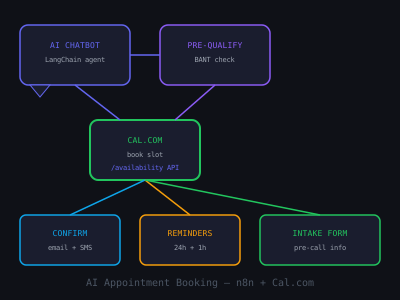
Phone calls to book appointments are a dying interaction. Customers want to book online, on their schedule, without talking to anyone. An AI-powered appointment booking system goes one step further, it converses naturally with leads, qualifies them, collects the information needed to make the appointment useful, and handles all confirmation and reminder logistics automatically.
In this guide you'll build a complete AI appointment booking system using n8n, Cal.com, and OpenAI. This is one of the most sellable automations for local service businesses, healthcare practices, legal firms, and any business that runs on scheduled consultations. The full build takes 4–6 hours the first time. After that you can deploy it for a new client in under 90 minutes using the reusable template.
Components of the AI Booking System
- AI chatbot, converses with the lead to understand their needs
- Pre-qualification, screens for fit before allowing calendar access
- Calendar integration, connects to Cal.com to show available slots
- Booking confirmation, sends confirmation email and SMS immediately
- Automated reminders, 24-hour and 1-hour reminders via both channels
- Pre-appointment intake, collects required information before the call
- Internal notification, alerts the service provider with full context
- No-show follow-up, re-engagement for missed appointments
Before writing a single node, map this out on a whiteboard or in FigJam. Clients understand visual diagrams. When you show a client the eight-component map and explain what each piece does for their business, they stop thinking about "chatbot" and start thinking about revenue recovery, filled calendars, and time saved. That shift is what gets the deal signed.
Step 1: Build the AI Chatbot Interface
The entry point for most clients will be a website chatbot. Use Crisp Chat, Tidio, or a custom chat widget. Configure the chatbot to be powered by an n8n webhook, every message the user sends triggers the workflow, which calls GPT-4o and returns a response.
Build the conversation flow with a LangChain agent node in n8n. Give the agent:
- A system prompt describing the business and its services
- Instructions to collect: name, email, phone, service needed, preferred time window
- Qualification criteria: if the lead doesn't qualify, politely explain and offer alternatives
- A tool to check Cal.com availability when the lead is ready to book
Use conversation memory (stored in Redis or a simple Airtable session table) so the agent remembers what was discussed in previous messages within the same session.
Writing the System Prompt
The system prompt is where most people underinvest and where you can immediately differentiate your build. A weak system prompt produces a generic chatbot. A strong one produces a booking assistant that sounds like it was trained specifically for that business.
Structure your system prompt in four sections. First, the persona: "You are Alex, the virtual booking assistant for Dr. Kim's dental practice. You are warm, professional, and efficient." Second, the context: list every service the practice offers, the typical appointment duration, and what types of patients they accept. Third, the qualification rules: "Only offer booking to patients with dental insurance or who confirm they can pay out of pocket. If the patient mentions a dental emergency, immediately provide the emergency phone number." Fourth, the collection requirements: the exact fields to gather before accessing the calendar, in the order they should be requested.
Add explicit instructions for edge cases: what to do if the lead asks a question you cannot answer, how to handle aggressive or off-topic messages, and what to say when no slots are available in the requested window. GPT-4o handles ambiguity well but it needs guardrails to prevent it from improvising answers about pricing, insurance, or medical advice that could create liability for your client.
Implementing Conversation Memory
Without memory, the chatbot treats each message as a fresh conversation. The lead has to repeat themselves and the experience feels broken. There are two practical approaches for n8n builds.
The simpler approach is Airtable. Create a table with columns for session ID, conversation history (JSON), created at, and status. At the start of each webhook trigger, look up the session ID (derived from the visitor's browser session cookie or the widget's conversation ID). Load the existing history, append the new message, run the agent, append the response, and save back to Airtable. This works well for up to a few hundred concurrent sessions.
The higher-performance approach is Redis. Use the n8n Redis node to GET and SET conversation history by session key. Redis reads and writes in under 5ms compared to Airtable's 200–500ms. For clients with high chat volume, this matters. Set a TTL of 2 hours on each session key so stale conversations are automatically cleaned up. If you are on n8n Cloud, use Upstash Redis, it has a free tier that covers most small business clients.
Step 2: Integrate With Cal.com
Cal.com has a full REST API. Set up a Cal.com account for your client and create an event type that matches the appointment they offer (e.g., "30-Minute Consultation"). Configure:
- Available hours (e.g., Mon–Fri 9am–5pm)
- Buffer time between appointments
- Maximum advance booking window (e.g., 14 days)
- Minimum notice required (e.g., 2 hours)
In n8n, add an HTTP Request node that calls the Cal.com API endpoint GET /availability to check open slots when the chatbot needs to offer times. When the user selects a slot, call POST /bookings to create the booking programmatically with their details pre-filled.
Cal.com API Details That Matter
The availability endpoint requires three parameters: eventTypeId (find this in Cal.com under the event type URL), startTime and endTime in ISO 8601 format, and timeZone. Always pass the lead's detected timezone, you can infer it from their browser via the chat widget or ask explicitly during the conversation. Showing times in the wrong timezone is one of the most common causes of no-shows.
The response from GET /availability returns a slots array. Each slot has a timefield. In your chatbot prompt, format these as human-readable options: "Monday March 31 at 10:00 AM, 11:00 AM, or 2:00 PM. Which works for you?" Offering three to four slots performs better than showing a full calendar grid in chat, it reduces decision fatigue and speeds up the conversation.
The POST /bookings endpoint creates the booking. Required fields: eventTypeId,start (ISO 8601), responses (object containing name, email, and any custom fields), and timeZone. Pass the phone number as a custom field, configure this in Cal.com under the event type's "Booking questions" section first, then reference it by its identifier in the API call.
Store the booking ID returned from the API. You will need it later to check booking status for no-show detection and to pass as a reference when updating or cancelling.
Step 3: Send Instant Confirmation
Immediately after the booking is created (triggered by the Cal.com Trigger node "BOOKING_CREATED"), fire two parallel notifications:
- Email confirmation, includes appointment date, time, Zoom/Meet link (auto-generated by Cal.com), what to prepare, and a reschedule link if needed
- SMS confirmation, short text with the essentials: date, time, and Zoom link
Use GPT-4o to personalize the confirmation email with a brief note that references what the lead said during the chatbot conversation. For example: "Based on our chat, you mentioned you're looking to automate your follow-up process. We've got some great examples to walk through in our session."
This personalization detail converts skeptical leads into excited ones. It signals that the business actually paid attention, even though no human was involved. Pull the key detail from the conversation history stored in your session table, pass the last 3–4 exchanges to GPT-4o with a simple prompt: "Based on this conversation, write one sentence that acknowledges the specific thing this person said they need help with."
Confirmation Email Template
Keep the subject line factual: "Your appointment with [Business Name], [Day, Date] at [Time]". People search their inbox for confirmations, a clear subject line means they find it when they need the Zoom link at 9:58 AM. The body should answer the four questions every lead has after booking: When is it exactly? Where do I go (or what link do I click)? What should I prepare? What if I need to change it?
For the SMS, stay under 160 characters so it sends as a single message. A template that works: "Confirmed: [First Name], your appt with [Business] is [Day] at [Time]. Join here: [link]. Reply STOP to opt out." Include the opt-out language, it is legally required in most jurisdictions and prevents spam complaints that can get your Twilio account flagged.
Step 4: Send Automated Reminders
Add a Schedule Trigger node that runs hourly and checks Cal.com for appointments in the next 25 hours. For any appointment that hasn't received a 24-hour reminder yet, send one now.
The 24-hour reminder should include:
- Appointment details (date, time, link)
- Any pre-appointment instructions ("Please have your website URL ready")
- A one-click reschedule link
- Contact information if they have questions
Repeat for a 1-hour reminder: shorter, just the Zoom link and time. This double-reminder system reduces no-shows by 40–60% compared to no reminders.
Tracking Reminder State
To avoid sending duplicate reminders, you need to track which reminders have been sent. Create an Airtable table called "Appointment Reminders" with columns for booking ID, 24h reminder sent (boolean), 1h reminder sent (boolean), and intake form sent (boolean). Before sending any reminder, check this table. After sending, update the record.
An alternative approach: use Cal.com webhooks instead of polling. The BOOKING_CREATED event fires immediately. Use an n8n Wait node to pause the workflow for the correct duration. For the 24-hour reminder, wait 23 hours after booking creation (not 24 hours before the appointment start, that distinction matters when bookings are created less than 24 hours out). For bookings made within 24 hours of the appointment, skip the 24-hour reminder and only send the 1-hour one. Add an IF node to check appointmentStart - now < 24 hours and branch accordingly.
The Wait node approach is cleaner than polling for most clients because it requires no reminder state table. The trade-off is that n8n Cloud charges for active executions, a client with 200 bookings per month will have 200 workflows sitting in a Wait state. For high-volume clients, the hourly polling approach with state tracking is more cost-efficient.
Step 5: Pre-Appointment Intake Form
24 hours before the appointment, send a short intake form link (Typeform or Tally). This collects any remaining information the service provider needs. For a law firm: matter type and brief description. For a marketing agency: current marketing channels and monthly budget. For a health practice: symptoms and medical history.
When the form is submitted, trigger an n8n workflow that:
- Updates the Cal.com booking with intake notes
- Creates a Notion or ClickUp task for the provider with all details
- Sends a Slack notification with the pre-appointment brief
Designing the Intake Form for Completion Rate
Intake form completion rates drop sharply above five questions. Keep forms to three to five questions maximum. Ask only what the provider genuinely needs before the appointment, anything else can be gathered during the call. Use Tally over Typeform for most client builds: Tally has a generous free tier, supports conditional logic, and the webhook integration with n8n is straightforward.
The timing of the intake form send matters. Sending it 24 hours before the appointment gets you a 60–70% completion rate. Sending it immediately after booking gets you 20–30%, people are still deciding if they want the appointment and treating it like commitment. Sending it 2 hours before is too late for the provider to review.
In the 24-hour reminder email, embed the intake form link prominently with a deadline: "Please complete your 2-minute intake form before your appointment tomorrow: [link]. This helps [Provider Name] prepare for your specific situation." When you frame it as benefiting the lead, better preparation means a better appointment for them, completion rates climb another 10–15 points.
Generating the Pre-Appointment Brief
When the intake form submits, use GPT-4o to generate a structured brief for the provider. Pass the chatbot conversation summary, the intake responses, and any CRM data you have on the contact. Prompt GPT-4o: "You are preparing a pre-appointment brief for [Provider Name]. Based on the following intake information, write a concise 3-bullet summary of who this client is, what they need, and what questions the provider should ask."
Providers love this. It turns a cold appointment with a stranger into a prepared conversation. When you demo this feature to prospective clients, show them an example brief, it is one of the most viscerally impressive moments in the demo because it makes the AI feel genuinely useful rather than just automated.
Step 6: Handle No-Shows
Add a workflow triggered 15 minutes after the appointment end time. Check if the Cal.com booking was marked as completed or no-showed. If no-showed:
- Send an immediate "We missed you" email with a reschedule link
- Send an SMS 30 minutes later: "Hey [Name], we missed our call. Want to reschedule? [link]"
- Add the contact to a 3-day re-engagement sequence if they don't rebook within 24 hours
Re-engaged no-shows convert at 25–35% when followed up properly, a significant revenue recovery opportunity.
The 3-Day Re-Engagement Sequence
Most no-show re-engagement stops after one message. The businesses that recover the most revenue run a structured three-day sequence. Here is the exact structure that consistently recovers 25–35% of no-shows:
Day 0 (immediate): The "we missed you" email. Warm tone, no guilt, immediate value. Subject: "We missed you today, here's how to reschedule." Include the reschedule link prominently. Keep it under 60 words.
Day 1 (24 hours later): A value-forward email that re-establishes why the appointment was worth having. Include a relevant case study, a quick insight related to what they said they needed, or a short piece of genuinely useful information. End with a soft CTA: "If you'd like to pick a new time, here's the link." This email does not mention the no-show.
Day 3: A short, direct email. Subject: "Should I close your file?" Body: "Hi [Name], I wanted to reach out one more time before I close your request. If you'd still like to connect, you can grab a time here: [link]. If now isn't the right time, no worries at all, just reply and let me know." The "close your file" subject line consistently generates the highest reply rate of the sequence. It triggers a loss-aversion response and gets responses from people who had simply forgotten to rebook.
Build this sequence in n8n using Wait nodes between each step. Add an IF node before each message that checks if a new booking has been created, if it has, exit the sequence immediately. You do not want to send a re-engagement email to someone who already rebooked.
Step 7: Internal Provider Dashboard
Most clients will want visibility into what the AI is booking without having to log into Cal.com. Build a lightweight daily digest that sends to the provider each morning at 7 AM. Use a Schedule Trigger in n8n that calls the Cal.com API for GET /bookings filtered to the current day, formats the results, and sends them via email or Slack.
The digest should include: appointment count for the day, each appointment with name, time, and service type, intake form completion status for each, and a link to the full Cal.com dashboard. Providers who get this digest report feeling more in control of their day and are less likely to churn from your service because they see the system working every single morning.
For clients on Slack, build a dedicated channel called #appointments. Post a booking notification every time a new appointment is created. The format: "New booking: [Name] booked a [Service] for [Day] at [Time]. Source: website chat. Intake form: pending." This gives the team real-time awareness without anyone having to check a calendar.
Industries That Buy This Immediately
Any business that lives and dies by its appointment calendar is an ideal buyer:
- Dental practices (average $500 appointment value)
- Legal consultations ($200–$500 per hour)
- Financial advisors and mortgage brokers
- Real estate agents (home tours, consultations)
- HVAC, plumbing, and home services (free estimates)
- Aesthetic clinics and med spas
For these businesses, a 10% improvement in booking rate from faster AI responses can mean tens of thousands of dollars per month. See our guide on pre-qualifying leads before calls and the comprehensive n8n agent building guide for more foundations.
Calculating ROI by Vertical
When you pitch this to a prospect, anchor the conversation on numbers. Here is how to frame the ROI for the most common verticals.
For a dental practice booking 80 appointments per month with a 20% no-show rate: that is 16 missed appointments at $300 average value = $4,800 in lost revenue monthly. A 50% reduction in no-shows from automated reminders recovers $2,400 per month. Your $500/month retainer has a 5x ROI before you count the additional bookings from 24/7 AI chat capture.
For a mortgage broker closing 8 loans per month with a 30% drop-off at the consultation stage: if AI booking converts 10% more of those website visitors into consultations, that is one additional loan per month at $2,000–$5,000 commission. The math makes the sale straightforward.
For HVAC and home services: the average estimate converts to a job at 40–60%. If 5 additional estimates per month are booked from after-hours AI chat (when competitors miss the inquiry), and 50% convert at $800 average job value, that is $2,000 in additional revenue monthly from a single automation.
Pricing This Service
An AI appointment booking system is a $1,500–$3,000 setup project plus $300–$800/month for maintenance, reminders, and updates. For high-volume practices (100+ appointments/month), the setup can justify $3,000–$5,000 given the direct revenue impact of reducing no-shows and improving booking conversion.
Structure your pricing in tiers rather than custom quoting every client. A three-tier structure works well for this type of build:
Starter ($1,500 setup + $300/month): AI chatbot with Cal.com integration, email and SMS confirmation, 24-hour and 1-hour reminders. Best for solo practitioners and small service businesses with under 50 appointments per month.
Growth ($2,500 setup + $500/month): Everything in Starter plus pre-appointment intake forms, GPT-4o personalized confirmations, provider Slack notifications, and no-show re-engagement sequence. Best for practices with 50–150 appointments per month.
Enterprise ($4,000 setup + $800/month): Everything in Growth plus multi-provider calendar routing, CRM integration (syncing contacts and bookings to their existing CRM), custom reporting dashboard, and priority support. Best for group practices, law firms with multiple attorneys, or any client with 150+ appointments per month.
The monthly retainer is what makes this business model sustainable. Build the case for it upfront: "The system runs 24/7 on your behalf. Every month I monitor it, handle any Cal.com or Twilio issues, update the AI prompts as your services change, and ensure every appointment is confirmed and reminded. You focus on delivering great work, I keep the calendar full."
Delivering and Handing Off to the Client
How you deliver this system matters as much as how you build it. A clean handoff creates confident clients who stick around, refer others, and upgrade their packages. A messy handoff creates anxious clients who second-guess every message the chatbot sends.
Record a Loom walkthrough of the entire workflow before the handoff call. Walk through: how the chatbot responds to different lead types, how to view bookings in Cal.com, how to update availability, what to do if the system sends a wrong message, and who to contact if something breaks. Keep it under 10 minutes. Send it the day before the handoff call so they arrive having already seen it.
On the handoff call, run a live test with the client watching. Have them open the chat widget on their own website and play the role of a lead. Walk through a booking together. Show them the confirmation email arriving. Show them the Slack notification. The real-time demo of a completed booking is the moment clients go from cautiously optimistic to genuinely excited, and excited clients write testimonials and send referrals.
Provide a one-page SOP they can give to their front desk: what the AI handles, what it escalates, how to update the Cal.com availability when their schedule changes, and the support contact for anything else. This SOP prevents the most common post-launch support issue: clients making changes to Cal.com settings that break the workflow without realizing it.
Get the Free Template
The complete n8n workflow template for this build is available for free inside our community. Download it and have this running for a client in under an hour.
Join Kingstone AI Operators, free, to access all templates.
Want to learn how to build and sell AI automations? Kingstone AI Operators is our free community for AI automation agency builders. Join Kingstone AI Operators, free.
FAQ
Frequently Asked Questions
How do I build an AI appointment booking system for clients?
Build a chatbot interface powered by an n8n webhook and GPT-4o that qualifies leads through conversation. Integrate Cal.com for calendar availability and booking creation via API. Add confirmation emails and SMS via Gmail and Twilio nodes. Set up automated reminders at 24 hours and 1 hour before the appointment. Include no-show follow-up with re-engagement sequences.
What tools do I need to build an AI appointment booking bot?
You need n8n for workflow orchestration, OpenAI GPT-4o for the conversational AI, Cal.com for calendar and scheduling, a chat widget like Crisp or Tidio for the website interface, Gmail or SMTP for email confirmations, Twilio for SMS reminders, and optionally Redis or Airtable for conversation memory storage.
How do I reduce no-shows with an AI booking system?
Send automated reminders at 24 hours and 1 hour before each appointment via both email and SMS. Include reschedule links in every reminder. For no-shows, send an immediate re-engagement email with a rebooking link, follow up with SMS 30 minutes later, and enroll in a 3-day re-engagement sequence. This approach reduces no-shows by 40 to 60 percent.
How do I connect Cal.com to n8n for automated booking?
Use the Cal.com REST API with HTTP Request nodes in n8n. Call GET /availability to check open slots when the chatbot needs to offer times. Call POST /bookings to create bookings with pre-filled lead details. Use the Cal.com Trigger node for BOOKING_CREATED events to fire confirmation and reminder workflows automatically.
What industries buy AI appointment booking systems?
Dental practices, legal firms, financial advisors, mortgage brokers, real estate agents, HVAC and plumbing companies, aesthetic clinics, and med spas are ideal buyers. Any business that runs on scheduled consultations and has high appointment values benefits significantly from AI-powered booking with automated reminders and no-show recovery.
How much should I charge for an AI appointment booking system?
Charge $1,500 to $3,000 for setup plus $300 to $800 per month for maintenance, reminders, and updates. For high-volume practices with 100 or more appointments per month, setup can justify $3,000 to $5,000 given the direct revenue impact from reducing no-shows and improving booking conversion rates.
How do I build a pre-appointment intake form with n8n?
Send a Typeform or Tally link 24 hours before the appointment via your reminder workflow. When the form is submitted, trigger an n8n workflow via webhook that updates the Cal.com booking with intake notes, creates a task in Notion or ClickUp for the provider, and sends a Slack notification with the pre-appointment brief.
Can I use GPT-4 to qualify leads before they book an appointment?
Yes. Configure the AI chatbot with qualification criteria in the system prompt. The GPT-4o agent collects name, email, phone, service needed, and preferred time window through natural conversation. If the lead does not meet qualification criteria, the agent politely explains and offers alternatives instead of showing the booking calendar.
Program · 90 days
Client Accelerator bundles the demo software with live coaching.
A one-time $1,499 purchase, or 4 interest-free payments of $374.75. Includes Ciela AI with 150 personalized demos each month throughout the program, the 90-Day AI Client System, two live group coaching calls every week, sales and outreach templates, 200+ n8n workflow templates, and private Build With Adhiraj resources.
See what is includedCiela AI is the demo platform for AI agencies and AI consultants. It turns any prospect's website into a live, personalized AI demo (chat, voice, or missed-call text-back) you can send before the first call.
Start Client AcceleratorCiela AI pricingAgent builds by nicheAll articles
Community · Training
Join Build With Adhiraj free.
Build With Adhiraj is the free community for people building and growing AI service businesses. Learn alongside other operators as you package, demonstrate, sell, and deliver practical AI systems.
Join Build With Adhiraj free