
How to Use Clay.com to Personalize Cold Emails at Scale
The era of "Hey {first_name}" personalization is over. Every prospect has seen a hundred cold emails that insert their name and company and call it personalization. What actually works in 2026 is contextually relevant personalization, referencing something specific about their business that makes the email feel like it was written just for them. The difference is measurable: campaigns using basic merge fields average 1-3% reply rates, while campaigns using context-rich personalization consistently hit 8-15% reply rates across B2B verticals. That gap represents the difference between a cold email channel that barely pays for itself and one that becomes your primary revenue driver.
Clay.com has become the industry standard tool for generating this kind of hyper-personalization at scale. It connects to 75+ data providers, enriches your lead list automatically using a waterfall model, and lets you build AI-powered custom variables that generate unique lines for each prospect. Before Clay, achieving this level of personalization meant hiring virtual assistants to manually research each prospect, spending 3-5 minutes per lead to find something relevant, write a custom line, and verify the data. At 5,000 leads per month, that is 250-400 hours of manual research. Clay compresses that down to a few hours of setup and review, letting a single operator run campaigns that would have required an entire SDR team. This guide covers the full workflow, from lead import to personalized campaign export.
What Is Clay and Why It Matters for Cold Email
Clay is a data enrichment and workflow automation platform built specifically for sales and outreach teams. It acts as a spreadsheet-like interface where each row is a lead and each column can be populated by calling external data providers or running AI prompts. Think of it as a programmable spreadsheet where every cell can make an API call to an external data source, and you can chain those calls together so the output of one column feeds into the next.
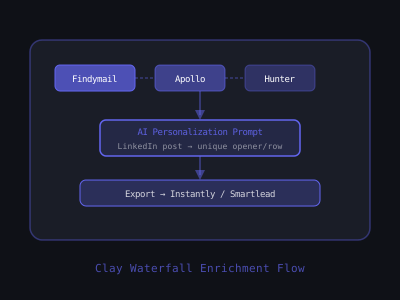
The key innovation is the waterfall enrichment model: instead of paying for one data provider and getting incomplete coverage, Clay tries providers in a sequence (first provider → if no data found, try next provider) until it gets a result. This means you pay for Clay credits only when data is actually found, and you get significantly higher enrichment coverage than any single provider. In practice, a waterfall of four email providers yields 65-80% coverage on a typical B2B list, compared to 40-55% from the best individual provider. For agencies and operators sending thousands of emails per month, that 20-30% improvement in coverage translates directly into more prospects reached and more pipeline generated.
What makes Clay particularly powerful for cold email practitioners is the combination of enrichment and AI processing in a single workflow. Previously, you would need to export from one enrichment tool, import into another, run a script to call an AI API, then combine everything in a spreadsheet before uploading to your sending tool. Clay collapses that entire pipeline into one table. You set up the columns once, and every new lead that enters the table automatically flows through the entire enrichment and personalization pipeline.
For cold email, this means you can build a list with:
- Verified email addresses (from Findymail, Apollo, Hunter, NeverBounce waterfall)
- LinkedIn profile data (recent posts, job title, company size, location)
- Company technographics (what tools they use, built with data)
- News and trigger events (funding rounds, new hires, product launches)
- AI-generated personalization lines specific to each prospect
Cold Email Reply Rates by Personalization Level
Step 1: Import or Build Your Lead List in Clay
Clay supports multiple ways to get leads into the system:
- CSV upload: Import a list you've built from Apollo, LinkedIn Sales Navigator, or any other source
- Clay's built-in prospecting: Use Clay's LinkedIn, G2, or Crunchbase integrations to search for leads directly
- LinkedIn Sales Navigator integration: Export search results directly to Clay (requires LinkedIn Sales Nav account)
- Webhook import: Pipe leads in from n8n, Zapier, or Make.com workflows automatically
Start with at minimum: first name, last name, company name, and either a LinkedIn URL or company domain. Clay can enrich everything else from these starting data points. The more seed data you provide, the higher your enrichment success rate will be, a LinkedIn URL gives Clay a direct path to pull profile data, while a company domain alone requires an extra lookup step to match the person to the organization.
Before importing, clean your list. Remove rows where the company domain is clearly a personal email provider (gmail.com, yahoo.com, outlook.com). Remove duplicates by matching on LinkedIn URL or the combination of first name + last name + company domain. If you are importing from LinkedIn Sales Navigator, export in batches of 2,500 and check that your search filters are tight enough, a broad search with 50,000 results contains too many irrelevant leads and wastes credits during enrichment.
A practical approach for agencies: build your initial list in Apollo or LinkedIn Sales Navigator using firmographic filters (industry, company size, geography, job title), export to CSV, then import into Clay for enrichment and personalization. This gives you the strongest targeting at the list-building stage and the strongest enrichment at the personalization stage. Avoid trying to do both in Clay, its built-in prospecting is useful for small lists, but dedicated prospecting tools offer better filtering for large-scale campaigns.
Step 2: Build a Waterfall Email Enrichment Column
Email verification is the most critical enrichment step. A high-bounce rate (above 3%) damages your sending domain reputation. Clay's waterfall model dramatically reduces bounces compared to using a single provider. The mechanics are straightforward: Clay calls Provider A first, and if it returns a verified email, the process stops. If Provider A returns nothing or an unverified result, Clay calls Provider B, and so on down the chain. You only spend credits on the provider that actually delivers the result.
To set up email waterfall enrichment:
- Add a new column in Clay → choose "Find Work Email"
- Select "Waterfall" mode
- Configure provider order: Findymail (highest accuracy) → Apollo → Hunter → Dropcontact
- Enable "Verify email on find" this runs a verification step on every found address
- Set enrichment to only consume credits when a valid email is found
The provider order matters. Findymail tends to have the highest deliverability accuracy for B2B contacts, so putting it first means most of your emails come from the most reliable source. Apollo has strong coverage for tech companies and startups. Hunter excels at pattern-based email discovery for larger organizations. Dropcontact serves as the catch-all with strong European business coverage. This specific ordering has consistently produced the lowest bounce rates in our testing across 200,000+ enriched contacts.
Target an email found rate of 65-80% for most B2B lead lists. LinkedIn-only contacts without a discoverable work email are excluded, which actually improves your deliverability, these are often role-based emails or outdated addresses anyway. If your found rate drops below 60%, check your input data quality. Missing company domains or incomplete names are the most common cause of low enrichment rates.
One critical detail: even with waterfall verification, run your final list through a standalone verification service like ZeroBounce or MillionVerifier before loading into your sending tool. This secondary verification catches the 1-2% of emails that pass provider-level checks but still bounce, and that 1-2% can be the difference between staying under the 3% bounce threshold and triggering spam filters.
Step 3: Enrich with LinkedIn Data for Personalization Context
LinkedIn profile data is the richest source of personalization material for cold email. Clay's LinkedIn enrichment (via Proxycurl or PhantomBuster) pulls:
- Current job title and seniority
- Company employee count and growth rate
- Years in current role
- Recent posts (last 3-5 LinkedIn posts)
- Skills and endorsements
- School and previous experience
Create a column called "LinkedIn Recent Post" using the Proxycurl enrichment. This becomes the input for AI personalization in the next step. Recent posts are the single most valuable data point for personalization because they reveal what the prospect is actively thinking about and care enough to share publicly. A reference to their recent content immediately signals that your email is not a mass blast.
Beyond recent posts, pull their job title, years in role, and company employee count into separate columns. These data points serve as fallback personalization inputs for prospects who do not post on LinkedIn (which is the majority, only about 5-10% of LinkedIn users post regularly). For non-posters, you can still generate relevant personalization based on their role tenure, company growth signals, or industry context.
Set up a conditional logic column that checks whether the LinkedIn Recent Post field is populated. If it is, flag that row as "post-based personalization." If not, flag it as "role-based personalization." This lets you route each lead to the appropriate AI prompt in the next step, one prompt optimized for post references, another optimized for role and company context. This two-track approach ensures every lead gets meaningful personalization, not just the ones who happen to be active on LinkedIn.
Credit management tip: Proxycurl charges 3-6 credits per LinkedIn profile enrichment. If you are processing large lists (10,000+ leads), enrich only the leads that passed email verification first. There is no point spending 5 credits to personalize a lead whose email address you could not find. Chain your columns so that LinkedIn enrichment only runs on rows where the email waterfall returned a verified address.
Step 4: Generate AI Personalization Lines with Claude / GPT
This is where Clay's power becomes clear. You can build a column that runs an AI prompt for every row in your table, generating a unique personalization line for each prospect based on their enriched data.
Add a new column → select "AI—Claude" or "AI—ChatGPT"
Example prompt structure for a personalization opener:
"Based on the following data about [first_name] at [company_name]: - Recent LinkedIn post: [linkedin_recent_post] - Job title: [job_title] - Company size: [employee_count] employees Write a 1-sentence, conversational personalization opener for a cold email from an AI automation agency. The opener should reference something specific from their post or situation. Don't start with 'I noticed' or 'I saw'. Maximum 25 words. No emojis."
The output column will have a unique first sentence for every prospect, things like "The capacity challenges you mentioned for Q2 are exactly where most HVAC companies we work with are focused right now." That feels genuinely personal because it is, it's based on what the prospect actually wrote.
For your fallback prompt (leads without LinkedIn posts), use a different structure that leans on role and company context: "Based on the following data about [first_name] at [company_name]: Job title: [job_title], Years in role: [years_in_role], Company size: [employee_count] employees, Industry: [industry]. Write a 1-sentence conversational opener for a cold email from an AI automation agency. Reference a common challenge that someone in their specific role and company size typically faces. Maximum 25 words. No emojis. Do not use generic phrases like 'as a busy [job_title]' or 'I know [job_title]s are always looking for.'"
Prompt engineering for Clay AI columns follows a specific pattern that produces consistent results. First, always specify the exact output format, one sentence, maximum word count, no greeting, no sign-off. Second, include negative instructions that block the most common AI crutches. Without explicit prohibitions, AI models default to openers like "I noticed your company is growing fast" or "I came across your profile," which every prospect has seen hundreds of times. Third, include 3-5 input variables so the AI has enough context to write something specific. A prompt with only a first name and company name produces generic output regardless of how well-written the instructions are, the model needs concrete data to work with.
Test your prompt on 20-30 rows before running it across the full table. Read every output and look for patterns: Are the openers specific enough? Do they vary in structure, or do they all follow the same template? Are there any hallucinations where the AI referenced something the prospect did not actually say? Iterate on the prompt until at least 85% of the test outputs are usable without editing. This upfront testing saves significant credit spend and manual cleanup time when you run the full batch.
Step 5: Add Company-Level Triggers for Higher Relevance
Beyond individual personalization, company-level trigger events dramatically improve reply rates because they create a natural "reason to reach out now." A prospect who just raised a Series B is in a fundamentally different buying mindset than the same prospect six months earlier, they have capital to deploy, pressure from investors to grow fast, and a mandate to build infrastructure. Timing your outreach to these trigger events can double your reply rate compared to non-triggered outreach. Clay integrates with several trigger data sources:
- Crunchbase: Recent funding rounds (Series A/B/C companies have budget and growth pressure)
- Builtwith / Clearbit Reveal: Technology stack (know what tools they use, position against or complement them)
- News API / Perplexity: Recent press mentions, product launches, executive changes
- G2 / Capterra reviews: Recent negative reviews of competing tools (strong buying signal)
- LinkedIn Company: Recent job postings (hiring for a specific role signals budget and initiative)
Create a "Trigger Context" column with a prompt like: "Based on the company signals below, write a 1-sentence reason why [company_name] might benefit from AI automation right now. Be specific. [recent_news] / [recent_funding] / [job_postings]"
The most effective trigger-based campaigns combine the individual personalization line with the company trigger in a two-part opener. The first line references something personal (their LinkedIn post or role context), and the second line references the company trigger (the funding round, the job posting, the technology they use). This one-two punch communicates that you researched both the person and the company, which is far more compelling than either signal alone.
Here is a practical ranking of trigger signals by impact on reply rates, based on aggregate data across B2B cold email campaigns: recent funding (strongest, 2-3x baseline reply rate), new executive hires (1.5-2x), job postings for roles you can help with (1.5-2x), technology stack changes (1.3-1.5x), and press mentions (1.2-1.4x). Prioritize funding and hiring triggers if you have limited credits, as they produce the highest ROI per enrichment dollar spent.
Not every lead will have trigger data available. That is expected. Build your workflow so that trigger enrichment is additive, leads with triggers get stronger personalization, but leads without triggers still flow through the pipeline with individual-level personalization. Do not discard a lead simply because you could not find a company trigger. The trigger data is a multiplier on top of an already-personalized email, not a prerequisite for sending.
Step 6: Quality-Check Your AI Outputs Before Sending
Running AI personalization at scale without a quality-check step is a recipe for embarrassing mistakes. Even the best prompts produce unusable outputs 5-15% of the time, hallucinated facts, generic filler phrases, awkward sentence structures, or references that do not actually match the prospect's data. Sending these unreviewed can damage your reputation worse than no personalization at all, because a wrong personalization signals carelessness in a way that a generic email does not.
Build a quality-check column in Clay using a formula or a second AI pass. The formula approach is faster and cheaper: create a column that flags any row where the personalization line contains known generic phrases ("I noticed your company," "I came across your profile," "I see that your business," "as a fellow"), exceeds 30 words, or is empty. Flag these rows with a "REVIEW" tag.
For the AI-based quality check, add a second AI column that evaluates the first: "Read the following cold email opener and rate it as GOOD or BAD. Rate as BAD if it: contains a factual claim not supported by the input data, uses generic language that could apply to any prospect, exceeds 25 words, or sounds robotic. Opener: [personalization_column]. Input data: [linkedin_recent_post] / [job_title] / [company_name]. Output only GOOD or BAD." Then filter your table to show only BAD-rated rows and manually rewrite those openers.
This hybrid workflow, AI for bulk generation, automated flagging for quality control, human review for edge cases, is the operational standard for agencies running personalized cold email at scale. Expect to manually review and fix 50-150 lines per 1,000 leads processed. Budget 15-20 minutes of manual review time per 1,000 leads. That is still a fraction of the time it would take to write all 1,000 lines manually.
Step 7: Export to Instantly or Smartlead
Once your list is enriched and personalization columns are populated, export to your cold email sending tool. Clay integrates natively with both Instantly and Smartlead.
Via Instantly integration:
- Add a "Push to Instantly" column in Clay
- Connect your Instantly API key
- Map Clay columns to Instantly campaign variables (e.g., your AI personalization column maps to the {personalization} variable in your email template)
- Set filter conditions: only push rows where email is verified and personalization column is not empty
In your Instantly or Smartlead email template, your sequence might start with:
"{personalization} Reached out because we've been helping [industry] companies [specific outcome]. Worth a quick conversation?"
The {personalization} variable gets replaced with the unique AI-generated opener for each prospect. Every email looks handwritten. None of them are. If you need a strong templated body to pair with the AI opener, our cold email generator drafts the rest of the message for you.
Map additional Clay columns to your sending tool for use in follow-up emails. Your second email in the sequence might use the {trigger_context} variable: "Following up on my note last week. Given [trigger_context], figured the timing might be right for a quick conversation about [outcome]." Using different personalization variables across your sequence emails means even your follow-ups feel relevant rather than repetitive.
Set your filter conditions carefully before pushing. The filter should require: email verification status is "valid," personalization column is not empty, and quality-check column is not "BAD" or "REVIEW." This ensures that only fully enriched, verified, and quality-checked leads enter your sending pipeline. Leads that fail any of these conditions stay in Clay for manual review or reprocessing.
A common mistake is pushing leads to your sending tool in a single batch and launching immediately. Instead, push in batches of 50-100 leads, send a test batch of 20-30, and check open rates and reply rates after 48 hours. If your open rates are below 40%, there is likely a deliverability issue with your sending infrastructure that personalization alone will not fix. If open rates are healthy (50%+) but reply rates are below 3%, revisit your personalization quality and offer. This staged approach prevents you from burning through thousands of prospects with a broken campaign.
Waterfall Email Enrichment Coverage vs. Single Provider
Clay Pricing and Credit Economics
Clay operates on a credit system. Credits are consumed when you run enrichments. Pricing as of 2026:
- Starter: $149/mo, 24,000 credits
- Explorer: $349/mo, 120,000 credits
- Pro: $800/mo, 300,000 credits
- Enterprise: Custom
Credit consumption varies by enrichment type. Email finding costs 1-5 credits per attempt (waterfall). AI column runs cost 1 credit per row. LinkedIn enrichment costs 3-6 credits per row.
For a typical agency workflow processing 5,000 leads per month with email finding, LinkedIn enrichment, and AI personalization, expect to consume 40,000-80,000 credits monthly. The Explorer plan is the right starting point for most agencies.
Here is a realistic credit budget breakdown for processing 5,000 leads: email waterfall enrichment at an average of 4 credits per lead (some found on first provider, some requiring all four) costs 20,000 credits. LinkedIn enrichment at 5 credits per verified lead (assuming 70% email found rate, so 3,500 leads enriched) costs 17,500 credits. AI personalization at 1 credit per enriched lead costs 3,500 credits. AI quality check at 1 credit per lead costs 3,500 credits. Total: approximately 44,500 credits for 5,000 input leads, yielding roughly 3,200 fully enriched and personalized contacts ready to email. That puts your cost per sendable personalized lead at roughly $0.11 on the Explorer plan, significantly cheaper than any manual research alternative.
To optimize credit spend, structure your Clay table so that expensive enrichments only run on leads that passed cheaper upstream checks. Put email verification first (cheapest per lead), then LinkedIn enrichment (only on verified emails), then AI personalization (only on leads with sufficient enrichment data). This cascading approach ensures you never spend 5 credits enriching a LinkedIn profile for a lead whose email you could not find.
Combine Clay personalization with a properly warmed sending infrastructure for maximum impact, see our guides on cold email infrastructure setup and deliverability checklist to make sure your personalized emails actually reach the inbox. For subject lines that maximize open rates on your personalized campaigns, see our guide on the best cold email subject lines for small business owners.
Want to learn how to build and sell AI automations? Kingstone AI Operators is our free community for AI automation agency builders. Join Kingstone AI Operators, free.
FAQ
Frequently Asked Questions
How do I use Clay.com to personalize cold emails at scale?
Import your lead list (CSV or LinkedIn Sales Navigator), configure waterfall email enrichment (Findymail > Apollo > Hunter > Dropcontact), add LinkedIn profile enrichment for personalization context, create an AI column (Claude or GPT) that generates unique first lines from enriched data, quality-check outputs, then export to Instantly or Smartlead with the AI personalization mapped to your email template variable.
How much does Clay.com cost for cold email personalization?
Clay pricing: Starter $149/month (24,000 credits), Explorer $349/month (120,000 credits), Pro $800/month (300,000 credits). Credit costs vary: email finding 1-5 credits per waterfall attempt, AI column 1 credit per row, LinkedIn enrichment 3-6 credits per row. A typical agency processing 5,000 leads/month needs the Explorer plan at $349/month (40,000-80,000 credits).
What is waterfall enrichment in Clay and why does it matter for cold email?
Waterfall enrichment tries multiple data providers in sequence until it finds a result. For email finding, Clay tries Findymail first, then Apollo, then Hunter, then Dropcontact. This gives 65-80% email found rates vs 40-55% from any single provider. You only pay credits when data is actually found. It dramatically reduces bounce rates because each provider adds verification coverage the others miss.
What AI prompt works best for generating cold email first lines in Clay?
Use a prompt with specific constraints: 'Write a 1-sentence conversational opener (max 25 words) for a cold email from an AI automation agency. Reference something specific from their recent LinkedIn post or business situation. Do not start with I noticed or I saw. No emojis.' Include input variables: [first_name], [company_name], [linkedin_recent_post], [job_title], [employee_count]. The key is specific output length, tone guidance, and explicit negative instructions.
How do I export Clay personalization data to Instantly or Smartlead?
Clay integrates natively with both tools. Add a 'Push to Instantly' column, connect your API key, map Clay columns to campaign variables (AI personalization column maps to the personalization variable in your template), and set filter conditions to only push rows where email is verified and personalization is not empty. In your email template, use the variable tag to insert the AI-generated opener for each prospect.
What data sources does Clay use for cold email personalization?
Clay connects to 75+ data providers including: Proxycurl and PhantomBuster for LinkedIn profiles and recent posts, Findymail/Apollo/Hunter for email finding, Crunchbase for funding data, BuiltWith for technology stacks, Google Maps for business listings and reviews, news APIs for press mentions, G2/Capterra for product reviews, and LinkedIn Company for job postings. Each enrichment source adds personalization context.
How do I quality-check AI-generated cold email first lines in Clay?
Build a Clay formula that flags low-quality outputs: if the AI first line contains generic phrases ('I noticed your company,' 'I came across your profile,' 'I see that your business') or exceeds 30 words, mark it for manual review. Expect 5-15% of outputs to need manual replacement. This hybrid approach (AI for bulk, human review for edge cases) delivers both scale and quality.
Program · 90 days
Client Accelerator bundles the demo software with live coaching.
A one-time $1,499 purchase, or 4 interest-free payments of $374.75. Includes Ciela AI with 150 personalized demos each month throughout the program, the 90-Day AI Client System, two live group coaching calls every week, sales and outreach templates, 200+ n8n workflow templates, and private Build With Adhiraj resources.
See what is includedCiela AI is the demo platform for AI agencies and AI consultants. It turns any prospect's website into a live, personalized AI demo (chat, voice, or missed-call text-back) you can send before the first call.
Start Client AcceleratorCiela AI pricingAgent builds by nicheAll articles
Community · Training
Join Build With Adhiraj free.
Build With Adhiraj is the free community for people building and growing AI service businesses. Learn alongside other operators as you package, demonstrate, sell, and deliver practical AI systems.
Join Build With Adhiraj free