
How Many LinkedIn Connection Requests Can You Send Per Day Without Getting Restricted?
LinkedIn restricts accounts that send too many connection requests too fast. In 2026, the platform is more aggressive about this than ever, and getting restricted can lock you out of outreach for weeks. If you are an AI agency owner relying on LinkedIn as a primary client acquisition channel, understanding these limits is not optional. A single restriction event can derail an entire month of pipeline building.
Here is the exact data on what is safe, what gets flagged, and how to maximize your reach without risking your account. This guide is based on community testing across thousands of accounts, aggregated data from outreach practitioners, and direct observation of how LinkedIn's behavioral systems respond to different activity patterns.
The Current LinkedIn Connection Request Limits (2026)
LinkedIn does not publish its exact limits publicly, but based on community testing and account data across thousands of users, here are the working limits as of early 2026:
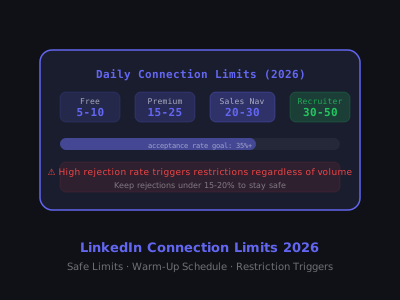
- Free accounts: 5-10 connection requests per day safely; up to 20 per day with low rejection rate; weekly cap of approximately 100
- LinkedIn Premium (Career/Business): 15-25 per day safely; weekly cap around 150-200
- Sales Navigator: 20-30 per day safely; some users report up to 40 with seasoned accounts; weekly cap around 200-250
- LinkedIn Recruiter: 30-50 per day; designed for volume outreach
The "safe" number is lower than the technical limit because LinkedIn's algorithm considers multiple signals, not just volume. A high rejection rate (people clicking "Ignore") triggers restrictions faster than hitting a volume cap. This is the fundamental point most people miss: LinkedIn penalizes poor targeting more harshly than it penalizes high volume.
Safe Daily Connection Request Limits by Account Type
Understanding these tiers is the starting point, but the real skill is operating within them while still building a meaningful pipeline. Most AI agency owners need to connect with 100-200 new prospects per month to sustain a healthy flow of discovery calls. That means you need to be strategic about every request you send, not just the volume, but the quality and targeting.
What Actually Triggers a LinkedIn Restriction
LinkedIn's restriction system is behavioral, not just numerical. The factors that trigger it:
- High ignore/rejection rate: If more than 15-20% of your requests are ignored or rejected in a short window, LinkedIn flags your account regardless of total volume.
- Sending requests to people with no shared context: No mutual connections, no shared groups, no profile views before the request, all increase rejection probability.
- Sudden volume spikes: Jumping from 5 requests per day to 50 overnight is a red flag. LinkedIn monitors rate of change, not just absolute numbers.
- Using automation tools on flagged IP ranges: Browser automation tools that operate at inhuman speeds or from data center IPs are detected separately from manual usage.
- New accounts sending high volume: Accounts less than 90 days old are held to stricter limits, typically 10-15 per day maximum.
The behavioral scoring is cumulative. One bad day of aggressive sending might not trigger anything, but three consecutive days of high-volume, low-acceptance outreach will almost certainly result in a restriction. LinkedIn tracks patterns over rolling windows of 7, 14, and 30 days, weighting recent behavior more heavily than historical performance.
The Hidden Trigger: Withdrawal Rate
A factor many outreach practitioners overlook is the withdrawal signal. If you routinely send connection requests and then withdraw them before the prospect responds, LinkedIn interprets this as erratic behavior. While occasional withdrawals are normal, a pattern of send-withdraw-send suggests automation or spam behavior to LinkedIn's detection systems. Keep your withdrawal rate under 5% of total requests sent.
Device and Session Patterns
LinkedIn also monitors the device and session patterns associated with your activity. If all of your connection requests originate from the same browser session at perfectly regular intervals, this creates a detectable automation fingerprint. Genuine human behavior involves variability, different times, occasional pauses, switching between desktop and mobile. If you are using automation tools, the best ones introduce randomization into timing, session duration, and activity patterns to mimic natural behavior.
The Account Warm-Up Schedule
If you are starting a new LinkedIn outreach campaign or have a fresh account, use this 8-week warm-up schedule to build sending capacity safely:
- Week 1: 5 requests per day, only to people with 2+ mutual connections
- Week 2: 8 requests per day, mix of mutual connections and shared groups
- Week 3: 10-12 per day, start including cold prospects with personalized notes
- Week 4: 15 per day, monitor acceptance rate, aim for 40%+
- Week 5-6: 18-20 per day if acceptance rate remains above 35%
- Week 7-8: 20-25 per day (Premium) or 25-30 per day (Sales Navigator)
Never skip weeks in this schedule even if you are in a hurry. LinkedIn's algorithm has a "memory" sudden jumps from week 1 to week 6 volume get caught. The warm-up period is an investment in long-term sending capacity. Agencies that rush through it and get restricted early spend far more time recovering than they would have spent completing the warm-up properly.
Warm-Up for Reactivated Accounts
If you have an existing LinkedIn account that has been dormant for several months, do not immediately resume high-volume outreach. Dormant accounts lose their behavioral trust score over time, and LinkedIn treats a sudden spike of activity from a previously quiet account with the same suspicion it gives to new accounts. For dormant accounts, use a modified 4-week warm-up: start at week 3 of the schedule above (10-12 per day) and progress from there. This acknowledges the account history while respecting the inactivity gap.
Warm-Up Activity Beyond Connection Requests
Connection requests should not be the only activity during your warm-up period. LinkedIn's behavioral model considers overall account engagement. During weeks 1-4, pair your connection requests with daily content engagement: comment on 5-10 posts in your niche, share one piece of content per day (even a repost with commentary), and endorse skills on existing connections' profiles. This supporting activity signals to LinkedIn that you are a genuine, engaged user, not a bot that only sends connection requests.
How to Maximize Acceptance Rate (Which Protects Your Limit)
The most important lever is not the daily number, it is your acceptance rate. A 50% acceptance rate on 20 requests per day outperforms a 20% acceptance rate on 40 requests per day in terms of both connections built and account safety. Every ignored or rejected request works against your behavioral score. Every accepted request strengthens it.
Impact of Acceptance Rate on Effective Monthly Connections
Tactics that increase acceptance rate:
- Always view the profile before sending a request: LinkedIn shows profile visitors, which creates curiosity and primes acceptance. Visit the profile, spend 10-15 seconds on it so it registers as a genuine view, then send your request within 24 hours.
- Send a personalized connection note: Notes that reference something specific about the person's work increase acceptance significantly versus blank requests. The key word is specific, a generic note like "I'd love to connect" performs worse than no note at all.
- Target people with 3+ mutual connections: Social proximity is the strongest predictor of acceptance. People are far more likely to accept a request from someone who shares multiple connections in their professional network.
- Connect with people who engage with your content: These prospects already have a warm signal toward you. If someone liked your post yesterday, a connection request today feels natural rather than random.
- Avoid connecting with obviously irrelevant profiles: Sending requests to people completely outside your ICP inflates rejection rates and wastes your daily allocation.
The Profile View Priming Sequence
An advanced tactic for maximizing acceptance rate is the three-touch priming sequence before you ever send a connection request. Day 1: view their profile. Day 2: engage with one of their posts (a thoughtful comment, not just a like). Day 3: send the connection request with a note referencing your comment. This sequence creates three touchpoints of familiarity before the ask, which dramatically increases the probability that the prospect recognizes your name and accepts. Agencies that use this priming approach consistently report acceptance rates above 50%, even for cold prospects.
What Happens When You Get Restricted
LinkedIn has two levels of connection request restrictions:
- Soft restriction: You are limited to sending requests only to people whose email address you know. This appears as a "Add email address" requirement on the connection button. Duration: typically 1-4 weeks.
- Account restriction: More severe, you may lose the ability to send any connection requests, and in serious cases, LinkedIn can suspend your account entirely.
If you hit a soft restriction, stop sending requests immediately for 7-10 days. Do not try to work around it with automation. Instead, focus on content posting and engagement to rebuild your account's behavioral score. During the restriction period, continue engaging with content in your niche, this signals active, legitimate use to LinkedIn's systems and helps accelerate the recovery of your behavioral trust score.
Recovery Protocol After a Restriction
After the restriction lifts, do not immediately resume your previous volume. Treat the post-restriction period as a mini warm-up. Start at 50% of your pre-restriction daily volume and increase by 2-3 requests per day over the following two weeks. Monitor your acceptance rate obsessively during recovery, a second restriction within 90 days of the first is treated much more severely by LinkedIn's systems and can result in a permanent account limitation.
During the recovery phase, prioritize quality over quantity. Send requests only to warm prospects: people with 5+ mutual connections, people who have engaged with your content, and people you have interacted with in comments. These high-probability acceptances rebuild your behavioral score faster than any volume strategy.
Free vs. Paid: Is Sales Navigator Worth It for Outreach Volume?
For serious B2B outreach, Sales Navigator is worth it, not just for the higher connection limits, but for advanced search filters, lead tracking, and InMail credits. The ROI is clear if you are generating even one client per month from LinkedIn.
However, the biggest mistake people make with Sales Navigator is treating the higher limits as permission to send volume without personalization. The same rules apply: maintain a 35%+ acceptance rate and warm up gradually. Sales Navigator users who blast 40 requests per day with generic notes get restricted just as fast as free account users who do the same thing.
The real value of Sales Navigator for connection request strategy is the filtering capability. You can build highly targeted prospect lists based on company size, industry, role, geography, and engagement activity, which means every connection request goes to someone who is genuinely relevant to your business. This targeting precision directly improves your acceptance rate, which in turn allows you to sustain higher daily volumes without triggering restrictions.
Sales Navigator InMail as a Connection Request Alternative
Sales Navigator includes InMail credits, messages you can send to anyone on LinkedIn without a connection request. InMails have their own limits (typically 50 per month) and their own acceptance dynamics, but they provide an alternative channel when you are approaching your connection request ceiling. The strategic play is to use connection requests for warm and moderately cold prospects (where acceptance is likely) and reserve InMails for high-value prospects who are outside your network and less likely to accept a connection request from an unknown sender.
The Weekly Rhythm That Keeps You Under the Radar
Rather than hitting the same number every day, vary your sending pattern. Real humans don't send exactly 20 requests every Monday through Friday. Try this weekly rhythm:
- Monday: 15 requests (start slow after the weekend)
- Tuesday: 22 requests
- Wednesday: 25 requests
- Thursday: 22 requests
- Friday: 15 requests
- Weekend: 0-5 requests maximum
Spread requests throughout the day. Sending all 25 in a 10-minute window looks like automation. Space them 20-40 minutes apart. The ideal distribution mirrors a busy professional who connects with people between meetings and during breaks, a few in the morning, a few around lunch, a few in the afternoon.
Time-of-Day Optimization
The time you send a connection request affects acceptance rate. Requests sent during business hours (8am-6pm in the prospect's timezone) have higher acceptance rates than those sent overnight or on weekends. The best windows are 8-10am and 4-6pm, when professionals are most likely to be checking LinkedIn. If you are targeting prospects in a different timezone, adjust your sending schedule accordingly. For AI agency owners targeting North American business owners, the sweet spot is typically Tuesday through Thursday, 9am-11am Eastern.
Pairing Connection Requests With a Full Outreach System
Connection requests are just the entry point. The real work happens in the follow-up sequence after someone accepts. A connection without a follow-up message is a wasted opportunity, you have a brief window of heightened interest after acceptance when the prospect is most receptive to conversation.
To see how connection requests fit into a complete LinkedIn outreach system for AI agency owners, read our guide on LinkedIn outreach sequence templates. And if you are still setting up your agency's go-to-market strategy, our guide on how to start an AI automation agency in 2026 covers LinkedIn as part of a broader client acquisition system.
The most effective outreach practitioners treat connection requests, follow-up messages, content engagement, and profile optimization as interconnected components of a single system. For guidance on optimizing your profile to maximize the conversion of accepted connections into conversations, see our guide on writing a LinkedIn About section that attracts clients.
Connection Request Notes: When to Use Them and When to Skip
There is an ongoing debate about whether to include a note with your connection request. The data is nuanced. For cold outreach to prospects who do not know you, a short personalized note increases acceptance significantly. But a generic note, especially one that sounds like a sales pitch, actually decreases acceptance compared to a blank request.
The rule of thumb: if you can write something genuinely specific about the person (a recent post they wrote, a mutual connection, a shared industry event), include a note. If your note would be generic enough to send to anyone, skip it and send a blank request instead. If you are stuck on wording, our LinkedIn connection request generator drafts personalized notes that stay under the character limit.
Keep notes under 200 characters. LinkedIn truncates longer notes on mobile, and the best-performing notes are typically one sentence. Examples that work well:
- "Saw your post on AI in supply chain, great perspective on the ROI question. Would love to connect."
- "We're both in [mutual connection]'s network. Your work at [company] looks interesting."
- "Fellow B2B founder in the automation space. Your recent growth is impressive."
Notes That Kill Acceptance Rate
Certain note patterns are so overused that they have become automatic rejection triggers for experienced LinkedIn users. Avoid these formats: "Hi [Name], I'd love to add you to my professional network" (LinkedIn's default text, signals zero effort), any note that pitches your service in the connection request itself, notes that are obviously templated with mail-merge fields that did not populate correctly, and any note over 250 characters that requires scrolling on mobile. The goal of the connection note is to get accepted, not to sell. Save the selling for the follow-up message after acceptance.
How LinkedIn's Algorithm Scores Your Account for Outreach
LinkedIn uses a composite behavioral score to decide how much outreach latitude your account gets. While the exact algorithm is proprietary, the key inputs are well-documented through community testing:
- Social Selling Index (SSI): LinkedIn's public score from 0-100, visible at linkedin.com/sales/ssi. Accounts with SSI above 70 tend to get more generous limits and fewer restrictions.
- Content engagement ratio: Accounts that regularly post and receive engagement are treated more favorably. A post with 50+ reactions signals a legitimate, active account.
- Profile completeness: Profiles with a photo, banner, headline, about section, and work history get better treatment than incomplete profiles.
- Connection acceptance velocity: How quickly people accept your requests. Fast acceptances (within 24 hours) signal relevance; requests that sit for weeks signal poor targeting.
- Report frequency: If anyone reports your messages or requests as spam, your behavioral score drops sharply. Even one or two reports can trigger a restriction.
Improving your SSI score is the single best way to increase your effective connection request limits. Focus on posting content 3-5 times per week, engaging with prospect content daily, and maintaining a profile completion score above 90%. To find the gaps holding your profile back, run it through our LinkedIn profile scorer.
Building SSI Score Strategically
The SSI score has four components, each worth 25 points: establishing your professional brand, finding the right people, engaging with insights, and building relationships. Most AI agency owners score well on "finding the right people" (because they use LinkedIn search actively) but poorly on "engaging with insights" (because they do not post or comment consistently). The fastest way to boost your overall SSI, and therefore your connection request latitude, is to focus on your weakest SSI component. Check your score weekly and target 5-point improvements each month through consistent activity.
Withdrawn Connection Requests: The Hidden Factor
Pending connection requests that go unanswered for more than 3-4 weeks should be withdrawn. LinkedIn counts these pending requests against your weekly limits, and a large backlog of unaccepted requests is a negative signal to the algorithm.
Check your pending requests weekly: go to My Network, then Manage, then Sent. Withdraw any request that has been pending for more than 21 days. This frees up capacity for new requests and improves your acceptance rate metrics by removing people who were never going to accept.
A common mistake is sending 100+ requests in a week and leaving them all pending. After 3 weeks, you have 100 unanswered requests dragging down your score. Proactive withdrawal keeps your metrics clean and your available capacity at maximum.
Automation Tools: Risk Assessment and Best Practices
The question of whether to use LinkedIn automation tools for connection requests is one every agency owner faces. The honest answer is that automation carries real risk, but the risk varies dramatically depending on the tool and how you use it.
Browser-based automation extensions (tools that run inside your Chrome browser) are the highest-risk category. LinkedIn can detect browser extensions through multiple vectors, including DOM manipulation patterns, JavaScript execution speed, and cookie behavior. If LinkedIn detects a known automation extension, the result is typically an immediate and sometimes permanent restriction.
Cloud-based automation platforms that access LinkedIn through their own infrastructure carry moderate risk. The best platforms use residential IP rotation, randomized timing, and human-like session patterns to avoid detection. However, any third-party tool accessing your LinkedIn account violates LinkedIn's Terms of Service, which means you accept the risk of account restriction or termination regardless of how sophisticated the tool is.
If you choose to use automation, follow these principles: never automate more than 70% of your maximum safe daily volume (leave headroom for manual activity), always use the tool's built-in randomization features, maintain the warm-up schedule regardless of automation capabilities, and have a manual outreach process ready as a fallback if your automation account gets restricted.
Building a Sustainable Long-Term Connection Strategy
The goal is not to maximize the number of connection requests you send today. The goal is to build a sustainable system that generates a consistent flow of new connections month after month without ever triggering a restriction. Agencies that approach LinkedIn connection strategy with this long-term mindset consistently outperform those who chase short-term volume.
The sustainable approach involves three principles. First, never operate at more than 80% of your estimated safe limit, this provides a buffer for the natural variability in LinkedIn's enforcement thresholds. Second, invest in acceptance rate optimization as your primary growth lever rather than increasing volume. Third, diversify your LinkedIn activity so that connection requests represent only one component of a broader engagement strategy that includes content posting, commenting, InMails, and group participation.
The most successful AI agency owners on LinkedIn are not the ones sending the most connection requests. They are the ones with the highest acceptance rates, the most consistent posting schedules, and the best-optimized profiles, which together create a compounding network effect that generates inbound connections and conversations without any outbound effort at all.
Want to learn how to build and sell AI automations? Kingstone AI Operators is our free community for AI automation agency builders. Join Kingstone AI Operators, free.
FAQ
Frequently Asked Questions
How many LinkedIn connection requests can you send per day in 2026?
In 2026, free LinkedIn accounts can safely send 5-10 connection requests per day, Premium accounts can send 15-25, and Sales Navigator users can send 20-30. These are practical safe limits, exceeding them consistently increases the risk of a soft or hard restriction on your account.
What is the weekly LinkedIn connection request limit for free accounts?
Free LinkedIn accounts have an approximate weekly cap of 100 connection requests. However, the actual limit varies based on your acceptance rate, account age, and activity patterns. Newer accounts are held to stricter limits of around 10-15 per day maximum for the first 90 days.
How do you warm up a new LinkedIn account for outreach without getting banned?
Start with 5 requests per day in week 1 (targeting people with mutual connections), then increase gradually over 8 weeks. By week 7-8 you can reach 20-25 per day for Premium accounts. Never skip weeks, and maintain an acceptance rate above 35% throughout the warm-up period.
Does LinkedIn Sales Navigator give you more connection requests per day?
Yes. Sales Navigator users can safely send 20-30 connection requests per day compared to 5-10 for free accounts. Some seasoned Sales Navigator accounts report sending up to 40 per day. You also get InMail credits for reaching people outside your network without a connection request.
What happens if you send too many LinkedIn connection requests at once?
LinkedIn has two restriction levels. A soft restriction requires you to provide an email address before sending requests (lasting 1-4 weeks). A hard restriction can suspend your connection request ability entirely, or in severe cases, your whole account. If you hit a restriction, stop all outreach for 7-10 days.
How can you increase your LinkedIn connection request acceptance rate?
View the prospect's profile before sending a request, always include a personalized note referencing their work, target people with 3+ mutual connections, connect with people who engage with your content, and avoid connecting with profiles outside your ideal customer profile. A 50% acceptance rate on 20 requests beats a 20% rate on 40 requests.
Is it safe to use LinkedIn automation tools for sending connection requests?
It depends on the tool. Browser automation tools that operate at inhuman speeds or from data center IP ranges are detected and flagged separately from manual usage. Cloud-based tools that mimic human behavior patterns and use residential proxies are safer, but still carry risk. Always warm up gradually regardless of the tool you use.
How many LinkedIn connection requests should you send per day to avoid the spam filter?
To stay well clear of LinkedIn's spam filter, keep daily volume under 20 for free accounts and under 25 for Premium accounts. Vary your daily volume instead of sending the same number each day, space requests 20-40 minutes apart, and keep weekend volume under 5. The spam filter also monitors your rejection rate, so targeting relevant profiles is just as important as volume.
Program · 90 days
Client Accelerator bundles the demo software with live coaching.
A one-time $1,499 purchase, or 4 interest-free payments of $374.75. Includes Ciela AI with 150 personalized demos each month throughout the program, the 90-Day AI Client System, two live group coaching calls every week, sales and outreach templates, 200+ n8n workflow templates, and private Build With Adhiraj resources.
See what is includedCiela AI is the demo platform for AI agencies and AI consultants. It turns any prospect's website into a live, personalized AI demo (chat, voice, or missed-call text-back) you can send before the first call.
Start Client AcceleratorCiela AI pricingAgent builds by nicheAll articles
Community · Training
Join Build With Adhiraj free.
Build With Adhiraj is the free community for people building and growing AI service businesses. Learn alongside other operators as you package, demonstrate, sell, and deliver practical AI systems.
Join Build With Adhiraj free