
How to Automate Law Firm Client Intake with AI (Complete Guide)
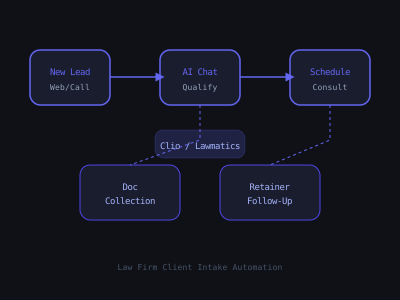
Law firms with broken intake processes share a common pattern: they receive inquiries, respond within hours or the next day, and wonder why their conversion rate is low. The answer is simple, clients in legal distress contact multiple firms simultaneously. The first to respond intelligently gets the case. AI-powered intake automation puts your firm in the first-to-respond position on every inquiry, 24 hours a day, without adding staff.
This guide covers how to build AI intake automation that does not disrupt your attorneys' workflow. The AI handles all administrative intake, response, qualification, scheduling, and document collection, and hands off only qualified, prepared prospects. Attorneys are not involved until a booked consultation is on the calendar with case documents already collected.
The Four-Stage Intake Automation Framework
A complete law firm intake automation follows four stages that mirror the human intake process but operate faster and more consistently. Stage one is instant response, every inbound inquiry (web form, missed call, chat widget) receives an SMS or email response within 30 to 60 seconds, acknowledging receipt and beginning the intake conversation. Stage two is AI qualification, a structured chatbot conversation collects the information needed to evaluate case viability for your practice areas, asking the questions your intake staff would ask, at any hour of the day.
Stage three is automatic scheduling, qualified leads receive a consultation booking link with specific available times, and the booking triggers automatically to your calendar system. Stage four is pre-consultation preparation, the booked client receives a document checklist, intake forms, and a reminder sequence that reduces no-show rates and ensures the attorney has case materials before the meeting.
Consultation-to-Retainer Conversion Rate by Response Time
Technical Setup for Law Firm Intake
The technical stack for law firm intake automation typically includes: n8n or Make for workflow automation, Twilio for SMS responses, OpenAI GPT-4 for the qualification chatbot, Calendly or Acuity for consultation scheduling, and Clio, MyCase, or a Google Sheets-based system for matter tracking. The whole system can be built in n8n with native integrations to all of these tools.
For web form integration: install a webhook on the firm's contact form that fires to an n8n webhook URL when submitted. The workflow extracts the prospect's name, phone number, email, and any initial information they provided in the form. Within 30 seconds, the Twilio node sends the first message in the intake conversation.
For missed call integration: configure the firm's phone system to send a webhook when a call goes unanswered, or use a Twilio number as the firm's main line and configure the missed-call trigger directly in Twilio. The same intake workflow fires, the prospect receives an SMS acknowledging the missed call within 30 seconds.
Building the AI Qualification Chatbot
The qualification chatbot uses GPT-4 to conduct a natural-language SMS conversation that collects case qualification information. In n8n, build a looping webhook workflow: the prospect replies to the intake SMS, the webhook fires, GPT-4 processes the message in context of the ongoing conversation, and Twilio sends the next question.
Configure the system prompt to define the chatbot's persona (it represents the firm, not "an AI"), the questions to ask for each practice area, the qualification criteria that determine case viability, and the handoff message when qualification is complete. The conversation should feel natural, the AI should handle freeform responses, not require yes/no answers to rigid questions.
Store each conversation message in a Google Sheet with the prospect's phone number as the key. This conversation history feeds into each GPT-4 call so the chatbot remembers what has been said. When qualification is complete, write a summary row to a separate tracking sheet with the lead score, practice area, and key case details.
CRM Integration and Attorney Handoff
When a consultation is booked, the workflow should automatically create or update a record in the firm's CRM. Clio's API supports automatic matter creation with the information collected during intake. MyCase, PracticePanther, and Lawmatics all support API or Zapier-based contact creation.
The attorney handoff notification is as important as the client-facing automation. When a consultation is booked and confirmed, notify the attorney (or the intake coordinator) via email with the consultation time, the prospect's case summary from the qualification conversation, and a link to the calendar event. This means the attorney walks into every consultation already knowing who they are meeting and what the case involves.
Law Firm Intake Automation Monthly Revenue Impact
What to Charge for Law Firm Intake Automation
Law firm intake automation is among the highest-value AI agency offerings available. The ROI is straightforward and compelling: for a personal injury firm, one additional retained case per month at $15,000 to $100,000 in attorney fees justifies a $1,500 to $2,000 per month retainer without any debate. Price your service accordingly.
A reasonable pricing structure: $1,497 to $2,497 per month for the complete intake system (instant response, AI qualification, scheduling, document collection, and reminders), plus a setup fee of $2,500 to $5,000 depending on complexity. For multi-attorney firms with multiple practice areas requiring separate qualification flows, the setup fee increases proportionally.
Always sell based on ROI, not on features. The pitch to a personal injury firm is: "You are currently missing 40% of your inquiries either through slow response or inconsistent follow-up. We estimate you are losing three to five cases per month to faster-responding competitors. At an average case value of $30,000 in attorney fees, that is $90,000 to $150,000 per month in missed revenue. Our system costs $2,000 per month and will recover at least one or two of those cases every month. The math is straightforward." For more on selling AI automation, see our ROI presentation guide.
Program · 90 days
Client Accelerator bundles the demo software with live coaching.
A one-time $1,499 purchase, or 4 interest-free payments of $374.75. Includes Ciela AI with 150 personalized demos each month throughout the program, the 90-Day AI Client System, two live group coaching calls every week, sales and outreach templates, 200+ n8n workflow templates, and private Build With Adhiraj resources.
See what is includedCiela AI is the demo platform for AI agencies and AI consultants. It turns any prospect's website into a live, personalized AI demo (chat, voice, or missed-call text-back) you can send before the first call.
Start Client AcceleratorCiela AI pricingAgent builds by nicheAll articles
Community · Training
Join Build With Adhiraj free.
Build With Adhiraj is the free community for people building and growing AI service businesses. Learn alongside other operators as you package, demonstrate, sell, and deliver practical AI systems.
Join Build With Adhiraj free