
How to Automate Your LinkedIn Content Creation and Posting With AI
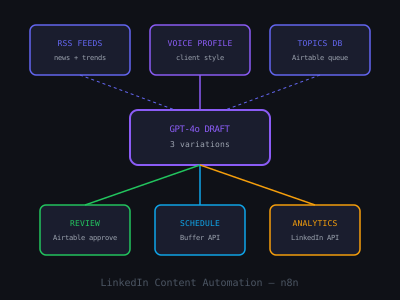
Consistent LinkedIn content is the most reliable way to build a client acquisition pipeline for an AI agency, but consistency requires time that most agency owners do not have. The solution is not to skip LinkedIn. The solution is to build an AI-powered content pipeline that handles the repetitive parts of content creation while keeping your authentic perspective front and center.
This guide walks through building a complete automated LinkedIn content workflow using n8n and OpenAI. The system generates first drafts from your topic library, queues them for your review, and schedules approved posts automatically. The result: three to five LinkedIn posts per week produced in under 30 minutes of your time. For the broader LinkedIn content strategy that this system supports, see our LinkedIn content pillar guide.
What to Automate and What Not to Automate
Before building, establish clear boundaries. Automation should handle topic sourcing from your content calendar, first-draft writing from your prompts, scheduling approved posts, and performance tracking. Automation should not handle publishing without review, generating posts without your input on the angle and message, or producing content that has not passed through your voice filter.
The human-in-the-loop step, your review and edit of every draft before it publishes, is non-negotiable. AI-generated content published verbatim is detectably generic and damages your credibility. The automation's job is to eliminate the blank-screen problem and compress the writing time. Your job is to add the specific details that make the content authentic.
Time Saved Per Post with AI-Assisted LinkedIn Workflow
Step 1: Build Your Topic Database
Create a Google Sheet with five columns: Topic, Content Type (story, framework, opinion, data, case study), Target Audience, Key Insight, and Status (pending/approved/published). Populate this sheet with 30 to 50 topics upfront, this gives you six to ten weeks of content before you need to refill. Set a recurring monthly reminder to add 20 new topics.
Topics should be specific. Not "AI automation benefits" but "why HVAC companies are losing 30% of after-hours leads to missed calls." Not "how to grow on LinkedIn" but "the specific LinkedIn post format that generated three discovery calls in one week for me." Specific topics produce specific, compelling first drafts. Generic topics produce generic, forgettable content.
Step 2: Build the Draft Generation Workflow in n8n
Create an n8n workflow with a Schedule Trigger set to run every Monday, Wednesday, and Friday morning at 6am. The workflow pulls the next topic with "pending" status from your Google Sheet, constructs a detailed prompt, sends it to OpenAI GPT-4, and deposits the draft in a review queue.
The prompt template is critical. Include your voice profile (key characteristics, what you never write), the specific topic from the sheet, the content type, the target audience, and specific format requirements (word count, structure, hook type). A strong prompt produces a draft that requires five to ten minutes of editing. A weak prompt produces a draft that requires a complete rewrite.
Example prompt structure in the n8n OpenAI node system message: "You are writing a LinkedIn post for [Name], an AI agency owner who specializes in [niche]. Voice: direct, specific, data-driven, never uses corporate jargon or motivational platitudes. Never use phrases like 'in today's fast-paced world' 'game-changing' or 'synergy'. Post type: [content type from sheet]. Topic: [topic from sheet]. Target audience: [audience from sheet]. Format: hook (one to two lines, under 200 characters), body (200 to 300 words, short paragraphs), closing question. Make the hook counterintuitive and specific."
Step 3: The Review Queue and Approval Workflow
After the OpenAI node generates the draft, write it to a "Review Queue" tab in your Google Sheet with the generated text, the original topic, and a timestamp. Then send yourself a Slack notification (or Gmail) with the draft and a direct link to the row. This notification is your cue to review.
Your review process should take five to ten minutes per post: read the draft, add one to two specific details that only you could know (a real client situation, a specific number from your work, a conversation you had), remove any phrasing that does not sound like you, and check the hook, is it specific and compelling? If the hook is weak, rewrite it. Once satisfied, change the status in the sheet to "approved" and add your scheduled publish time.
Step 4: Scheduled Publishing
LinkedIn's API allows native post scheduling for personal profiles via the LinkedIn API (accessible through RapidAPI or directly with an approved developer application). Alternatively, Buffer, Taplio, or Metricool support LinkedIn scheduling and integrate with n8n via their APIs.
Build a second n8n workflow that runs every morning, checks your Google Sheet for posts with "approved" status and a scheduled time in the next 24 hours, and publishes them to LinkedIn at the scheduled time. After successful publishing, update the status to "published" and log the post ID for later performance tracking.
LinkedIn Posting Frequency vs. Monthly Profile Views
Using Ciela AI Instead of Building from Scratch
Building the n8n workflow above is educational and gives you full control over the process, but it takes several hours to set up and requires ongoing maintenance. For AI agency owners who want the same outcome without the technical overhead, Ciela AI provides this entire workflow in a purpose-built platform: topic management, AI drafting with voice profile training, a review interface, and scheduled publishing designed specifically for LinkedIn content.
The choice between building your own workflow in n8n and using a tool like Ciela AI depends on your priorities: control and customization versus speed and simplicity. Either approach produces the same core outcome, consistent LinkedIn content with a fraction of the manual effort. The most important thing is not which tool you use, but that you actually publish consistently. Three posts per week for 12 months beats 15 posts per week for three months. The AI automation exists to make consistency sustainable, not to replace your judgment or your voice.
Program · 90 days
Client Accelerator bundles the demo software with live coaching.
A one-time $1,499 purchase, or 4 interest-free payments of $374.75. Includes Ciela AI with 150 personalized demos each month throughout the program, the 90-Day AI Client System, two live group coaching calls every week, sales and outreach templates, 200+ n8n workflow templates, and private Build With Adhiraj resources.
See what is includedCiela AI is the demo platform for AI agencies and AI consultants. It turns any prospect's website into a live, personalized AI demo (chat, voice, or missed-call text-back) you can send before the first call.
Start Client AcceleratorCiela AI pricingAgent builds by nicheAll articles
Community · Training
Join Build With Adhiraj free.
Build With Adhiraj is the free community for people building and growing AI service businesses. Learn alongside other operators as you package, demonstrate, sell, and deliver practical AI systems.
Join Build With Adhiraj free