
How to Automate Review Requests for Local Business Clients Using AI
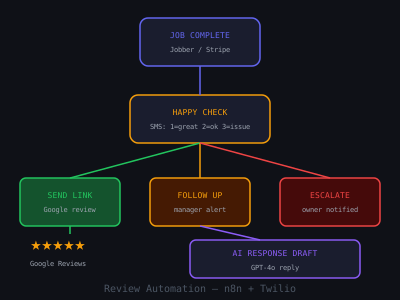
Online reviews are the lifeblood of local businesses. A plumber with 200 Google reviews and a 4.8 rating gets the call over a competitor with 15 reviews every single time. Yet most local businesses collect reviews at 2–5% of the rate they could, because they never ask at the right moment, ask inconsistently, or don't ask at all.
An automated review request system changes this immediately. By sending a perfectly timed review request at the peak moment of customer satisfaction, right after a job is completed, review collection rates jump to 15–30%. This guide shows you exactly how to build it, what copy to use, which industries respond best, and how to sell it as a recurring service.
Review Request SMS Conversion Rate by Industry
Why Automated Review Requests Work (The Data)
The key to high review conversion is timing and frictionlessness. Customers are most willing to leave a review within 2 hours of a positive experience. After 24 hours, willingness drops by roughly 70%. After a week, most customers have forgotten the interaction entirely.
Manual review collection fails because it depends on the business owner remembering to ask, and on the customer being willing to search for the review form themselves. Automated systems remove both friction points: the request goes out automatically at the optimal moment, and the direct Google review link means leaving a review takes under 60 seconds.
Here's what the numbers look like across industries when a proper automated system is deployed:
- HVAC / plumbing / electrical: 12–18% SMS conversion, 4–6% email conversion
- Dental / medical practices: 8–14% SMS conversion (HIPAA-safe messaging required)
- Auto repair shops: 15–22% SMS conversion, customers just paid, satisfaction is high
- Restaurants (post-reservation): 10–16% SMS conversion via OpenTable or Resy trigger
- Hair salons / barbershops: 18–25% SMS conversion, short visit, high emotional satisfaction
- Law firms / accountants: 5–10%, longer delay (3–5 days post-service) works better
A typical HVAC business serving 80 customers/month at 15% conversion generates 12 new Google reviews monthly. In six months that's 72 reviews. Competitors who've been operating 10 years with no system often have fewer. The compounding SEO advantage is enormous, BrightLocal data shows businesses with 100+ reviews rank 17% higher in Google Maps than businesses with under 50.
What You'll Build
- Job completion trigger, detects when a job is marked done in the client's system
- Sentiment pre-check, confirms satisfaction before routing to Google
- Review request delivery, sends SMS + email with direct Google review link
- Follow-up sequence, 2-touch follow-up for non-responders, with smart stop logic
- Review monitoring, daily check for new reviews, owner alert
- AI response drafts, GPT-4o generates personalized response drafts for approval
Step 1: Set Up the Completion Trigger
Different businesses mark job completion in different ways. The trigger is the most important part of the build, get this wrong and your timing is off and the whole system underperforms. Common integrations:
- ServiceTitan / Jobber / Housecall Pro, job status changed to "Completed" via webhook. These platforms all support outbound webhooks natively. In n8n, use a Webhook node set to POST, then paste the URL into the field service software's webhook settings.
- Square Appointments, appointment marked complete via the Square webhook API. Event type:
appointment.updated, filter for status = completed. - Stripe, payment received event (
payment_intent.succeeded). Works well for service businesses that collect payment on completion. The customer just paid, satisfaction is at peak. - Calendly / Acuity, appointment end time + buffer. Use a scheduled trigger in n8n that polls for appointments ending within the last 30 minutes.
- Manual Google Form or Tally, technician fills out a simple form on their phone after each job. Fields: customer name, phone, email, job type, any notes. This is the fallback for businesses without digital systems.
- Airtable / CRM status change, n8n polls the record every 15 minutes; when status changes to "Completed," the workflow fires.
For businesses without any digital job management (still common in plumbing, landscaping, and pest control), the Tally form approach is the fastest path to live. Build the form in 10 minutes, send the techs the link, and you have a working trigger. Upgrade to a webhook-based trigger later once the client sees the value.
One important detail: always extract the customer's name, phone number, email, and the specific service performed from the trigger. You'll use all four in the messages. Generic messages ("Thanks for your business!") convert at about half the rate of personalized ones ("Hi Maria, glad we could fix your AC so fast today!").
Step 2: The Sentiment Pre-Check (Never Skip This)
Before sending a review link, confirm the customer is actually happy. This single step is the difference between building your client's rating and blowing it up. Add a Twilio SMS node that fires 30–60 minutes after job completion:
"Hi [Name]! This is [Business Name]. How did everything go today? Reply 1 for Great, 2 for Okay, or 3 if there was an issue. We're here either way."
Add a Webhook node to receive the reply and branch with an IF node:
- Reply "1" (Great) → wait 15 minutes, then send the Google review link
- Reply "2" (Okay) → send: "Thanks for letting us know. What could we have done better?" collect the response, alert the manager, do not send review link
- Reply "3" (Issue) → immediately escalate to owner via Slack or SMS, route customer to a private feedback form, flag record in CRM. Never send review link.
- No reply after 90 minutes → skip the happy check entirely and proceed to send the review request. Most no-reply customers are neutral or happy, they just didn't engage with the pre-check.
An alternative approach that works slightly better for dental and medical clients: build a one-question landing page ("How was your visit today?") with star ratings 1–5. Stars 4–5 route to Google. Stars 1–3 route to a private form. This is cleaner for HIPAA purposes and gives more granular data. Build it in Framer or even a simple Tally embed.
The business case for the pre-check: one angry customer leaving a 1-star review on Google can require 5–10 new 5-star reviews just to recover the average rating. The pre-check costs you nothing and prevents the scenario entirely.
Step 3: Send the Review Request, Templates That Convert
To get the Google review link for any business, go to the Google Business Profile dashboard, click "Ask for reviews," and copy the short link. This link opens the Google review dialog immediately with no extra steps. Bookmark it for each client.
Send two simultaneous messages: SMS first, email as reinforcement. Here are the exact templates by industry:
Home Services (HVAC, Plumbing, Electrical)
SMS: "Hi [Name], it's [Tech Name] from [Business]. Glad we could take care of that [service] for you today. If you have 30 seconds, a Google review would mean the world to us: [link] Thanks! 🙏"
Email subject: "Quick favor, [Name]?, [Business Name]"
Email body: Thank you message, photo of the completed work if available, one large "Leave Us a Review" button linked to the Google review form. Keep it to 3 sentences max. Long emails get skipped.
Restaurants / Food Service
SMS (sent 30 min after reservation end time): "Hi [Name]! Hope you enjoyed dinner at [Restaurant] tonight. We'd love to hear your thoughts, takes 30 seconds: [link] See you next time!"
Trigger: reservation end time + 30-minute buffer via OpenTable or Resy webhook.
Medical / Dental (HIPAA Consideration)
Do not mention the type of service in the message, this can expose PHI. Keep the SMS generic:
SMS: "Hi [Name], thank you for visiting [Practice Name] today. If you have a moment, we'd appreciate a Google review: [link] It helps our team a lot."
Always confirm with the client that they've reviewed this with their compliance officer before deploying. Some practices use in-office NFC tap cards instead of automated SMS for HIPAA peace of mind.
Auto Repair
SMS (send immediately after invoice is paid): "Hey [Name]! Your [vehicle] is all set. Thanks for trusting us with it, if we did a good job, a quick Google review helps us a ton: [link] Drive safe!"
Auto repair has among the highest SMS conversion rates because the trigger (payment) is an unambiguous completion signal and the customer has just experienced relief, their car works again.
Step 4: Build the Follow-Up Sequence with Smart Stop Logic
Most review conversions happen within 24 hours of the first request. But a 2-touch follow-up meaningfully improves total monthly volume, typically by 30–40% over a single-touch approach.
The sequence:
- Touch 1 (T+1 to 2 hours): The initial SMS + email described above.
- Touch 2 (T+48 hours): Gentle SMS reminder, "Hi [Name], just a quick reminder in case you missed our earlier message, a Google review would really help us out: [link] No worries if not!"
- Touch 3 (T+7 days): Final email, subject line: "Last one from us, [Name]". Body: One sentence thanking them, link, promise to never ask again. After this, permanently stop the sequence for this customer.
Smart stop logic is non-negotiable. Track each customer in an Airtable base with columns for: customer name, phone, email, trigger date, touch 1 sent, touch 2 sent, touch 3 sent, review left (yes/no), sequence stopped. In n8n, before each touch, query Airtable: if "review left" = yes OR "sequence stopped" = yes, skip the send node. Otherwise, send and update the record.
How do you detect whether a review was actually left? Two options: (1) Use the Google Business Profile API to poll for new reviews and cross-reference the customer name/date, or (2) build a simple landing page with a "I already left a review!" button that customers can click, this sets the Airtable flag and stops the sequence immediately. Option 2 is simpler and surprisingly effective.
One more rule: if a customer replies to any message with a negative word ("no," "stop," "unsubscribe," "not interested," or any complaint), the n8n workflow must immediately flag the record, halt all future touches, and alert the business owner. Never continue sending to someone who's expressed displeasure. Twilio automatically handles STOP replies for SMS compliance, but you need to build the logic for content-based stops too.
Step 5: Monitor Reviews and Automate Responses
New reviews require a response, quickly. Google rewards businesses that respond to reviews with higher local rankings. BrightLocal data shows businesses that respond to reviews see 45% more profile views. More importantly, how a business responds to a negative review is often what potential customers read most carefully.
Set up a daily review monitor using the Google Business Profile API (or a polling service like GatherUp or Whitespark if the client prefers to avoid API setup complexity). When a new review is detected:
- Send a Slack or SMS notification to the business owner with the review text, star rating, and reviewer name.
- Pass the review to GPT-4o with a prompt that includes: the business name, the service type, the review text, and instructions to write a 2–3 sentence response that is warm, specific (references what the reviewer mentioned), and ends with an invitation to return. Never generic.
- Send the draft response to the owner via email with a single "Approve and Post" link.
- When approved, post the response via the Google Business Profile API.
The GPT-4o prompt matters a lot here. A prompt like "Write a 2-sentence response to this Google review for a plumbing company" produces a generic result. A better prompt:
"You are responding to a Google review on behalf of [Business Name], a [service type] business in [city]. The response should sound like it was written by the owner personally, warm, direct, and specific to what the reviewer mentioned. Never use phrases like 'Thank you for your feedback' or 'We strive to provide.' Reference one specific detail from the review. End with a specific invitation to return. Keep it under 60 words. Review: [review text]"
For negative reviews (1–2 stars), adjust the prompt to acknowledge the issue, apologize without being defensive, and offer a path to resolution (phone number or direct email). The goal is to demonstrate to potential customers reading the exchange that the business takes problems seriously and responds fast.
Step 6: Build the Physical Layer (NFC Cards and QR Codes)
The digital automation is the backbone, but adding physical touchpoints to the system dramatically improves in-office or in-person collection rates. Build these as upsells or include them in your setup package:
- NFC tap cards, small business cards embedded with an NFC chip that, when tapped to a smartphone, opens the Google review form directly. Cost: $12–20 per card. Works for any business where the owner or staff interact with customers face to face. Order from Popl or Tapt. Program with the Google review link.
- QR code table tents / stickers, for restaurants, waiting rooms, reception desks. A simple Canva design with the business logo, "Leave us a review" headline, and a QR code linking to the Google review form. Print at Canva Print or locally for under $30 for a set of 10.
- Technician vehicle window clings, QR code on a vehicle wrap or window cling so customers who see the truck in their neighborhood can leave a review on the spot.
- Receipt/invoice inserts, for shops and medical offices: a small card inserted with the paper receipt. "Loved your experience? 30 seconds on Google helps us more than you know: [QR code]"
Physical touchpoints plus the automated digital sequence create a multichannel system. Many clients see their best conversion month in month two, after both channels are live and staff have been trained to use the NFC cards.
Step 7: Build the Review Dashboard and Monthly Report
Clients need to see the value of what they're paying for every month. A simple Airtable view or Google Sheets dashboard showing review velocity over time is often the most powerful retention tool you have. Build it to show:
- Total Google reviews (current vs. 30 days ago vs. 90 days ago)
- Average star rating trend over time
- Review requests sent this month
- Conversion rate (reviews generated / requests sent)
- Response rate to reviews
- Negative feedback intercepted by the pre-check (this number alone justifies the service)
Automate the monthly report delivery: on the first of each month, n8n pulls the Airtable data, passes it to GPT-4o to write a brief narrative summary ("You received 24 new reviews in February, up from 11 in January. Your rating rose from 4.5 to 4.7. Three potential negative reviews were intercepted before reaching Google."), and emails the report to the client. Takes 30 seconds of their time and makes you look like a strategic partner, not a vendor.
How to Sell Review Automation to Local Business Clients
Review automation is one of the highest-converting services to pitch to local businesses because the problem is universally understood and the ROI is concrete. Here's how to frame the conversation:
Opening hook: "When someone in [city] searches for a [plumber/dentist/restaurant], what do you think they look at first? Reviews. And the businesses with the most recent, highest-rated reviews win the click. How many Google reviews did you get last month?"
Most business owners will say 2–5 (or none). Then:
The math close: "You serve roughly [X] customers a month. If we send each one a perfectly timed review request, conservatively 10–15% will leave a review. That's [X * 0.12] new reviews a month. In six months you go from [current count] to [current + 6x] reviews. Your competitor has been open for 12 years and has 40 reviews. You'll pass them in three months."
The protection pitch: "The system also intercepts unhappy customers before they reach Google. Instead of a 1-star public review, you get a private message you can respond to. That alone is worth the price."
Objection: "Can't I just ask customers myself?" Answer: "You could. But you said you serve 80 customers a month and you got 3 reviews. The gap between what you intend to do and what actually happens at the end of a busy day is exactly the problem this solves. It runs automatically."
Pricing and Packaging
Review automation is one of the easiest AI services to sell to local businesses because the benefit is immediately visible. A plumber who goes from 20 Google reviews to 100 in 6 months will tell you it changed their business.
Package options:
- Starter ($297–$497/month): Basic SMS review request, 2-touch follow-up, Airtable tracking. Setup fee: $300. Best for small shops under 30 customers/month.
- Professional ($497–$797/month): Sentiment pre-check + email + follow-up sequence + review monitoring + Slack alerts. Setup fee: $500. The core offering for most local businesses.
- Full Service ($797–$1,200/month): Everything above + AI response drafting + monthly report + NFC cards + QR code assets. Setup fee: $750. Sell this to practices and businesses where reputation is a primary revenue driver (dentists, law firms, premium restaurants).
Your actual cost per client: Twilio at $0.01/SMS, for 80 customers with 3 touches that's $2.40/month. n8n self-hosted is essentially free. Airtable free tier handles most clients. You are selling the system, the setup, and the ongoing management, not the tools.
Bundle with other local business automations, missed call text-back and instant lead response, for a complete local business AI package at $1,200–$2,000/month. For help writing proposals that close these deals, see our AI automation proposal writing guide. To structure these as retainer engagements, read our retainer model guide. Review automation is usually the easiest entry point because the pitch is simple and the results are visible within 30 days.
Review Collection, Automated vs Manual Monthly Output
Common Mistakes to Avoid
- Sending too soon, for home services, wait 30–60 minutes. For restaurants, wait until after the meal ends, not mid-dinner. For medical, wait 24 hours. Timing by industry matters.
- Skipping the sentiment pre-check, one 1-star review from an unhappy customer can take months to dilute with positive reviews. Never skip the pre-check for service businesses.
- Generic messages, using the customer's name and the specific service performed can double conversion rate versus a generic "thanks for your business" message. Always personalize.
- Not stopping on negative reply, if a customer replies with frustration or asks to stop receiving messages, the sequence must halt immediately and the owner must be alerted. Not doing this is both a compliance risk and a relationship destroyer.
- Ignoring negative reviews once they appear, the AI response system is critical. An unresponded 1-star review with no owner reply looks far worse to potential customers than one with a thoughtful response.
- Deploying without getting the Google review link, this sounds obvious but it's a common miss. Confirm the link works on mobile before going live. The link format is:
https://g.page/r/[business-ID]/review. Test it on an actual phone. - Not training the staff, the automated system handles customers who gave their contact info digitally. But many local businesses have walk-in customers who never enter a booking system. Train the front desk or technicians to hand out the NFC card or ask verbally. The automation is the floor, not the ceiling.
Want to learn how to build and sell AI automations? Kingstone AI Operators is our free community for AI automation agency builders. Join Kingstone AI Operators, free.
FAQ
Frequently Asked Questions
How do I automate Google review requests for local business clients?
Build an n8n or Make workflow triggered by appointment completion in the client's CRM or POS system. After a set delay (1-2 hours post-visit), send an SMS with a direct Google review link. Follow up with an email if no review is left within 48 hours. Include a sentiment pre-check, positive experiences go to Google, negative feedback routes to an internal form so the business can address it privately.
What is the best timing for sending automated review requests?
Send the first SMS request 1-2 hours after the appointment or visit while the experience is fresh. Send a follow-up reminder 48 hours later if no review was left. A final gentle nudge 5-7 days later captures stragglers. Avoid sending requests during off-hours (before 9am or after 8pm). SMS has a 98% open rate and most customers read it within 3 minutes, making it the highest-converting channel.
How many Google reviews can automated review requests generate per month?
Most local businesses see 15-30 new Google reviews per month with automated requests, compared to 2-5 reviews per month without a system. The conversion rate from request to review typically runs 10-20% for SMS and 3-8% for email. Businesses with higher customer satisfaction and shorter visit durations (like quick-service restaurants or retail) tend to see higher conversion rates.
How much should I charge for automated review generation services?
Charge $197-$397/month for standalone review automation. Bundle it with lead follow-up or appointment reminders for $497-$797/month. Setup fees of $300-$500 are standard. Position the ROI clearly: restaurants and medical practices with 500+ positive reviews get 23% more organic traffic than those with fewer than 200. One additional customer per month from improved rankings more than covers the service cost.
Should I use a sentiment filter before sending review requests?
Yes, always. Build a landing page with a simple 'How was your experience?' question before routing to Google. Customers who rate 4-5 stars get directed to Google reviews. Customers who rate 1-3 stars get routed to a private feedback form that alerts the business owner. This protects your client's rating while still capturing valuable feedback from unhappy customers.
What tools do I need to build automated review request systems?
The core stack includes an automation platform (n8n or Make), an SMS provider (Twilio at roughly $0.01 per message), a landing page builder for the sentiment pre-check, and access to the client's CRM or booking system for trigger events. Optional additions include NFC tap cards ($15 each) for in-office review requests, QR code table tents, and a dashboard for tracking review velocity.
Program · 90 days
Client Accelerator bundles the demo software with live coaching.
A one-time $1,499 purchase, or 4 interest-free payments of $374.75. Includes Ciela AI with 150 personalized demos each month throughout the program, the 90-Day AI Client System, two live group coaching calls every week, sales and outreach templates, 200+ n8n workflow templates, and private Build With Adhiraj resources.
See what is includedCiela AI is the demo platform for AI agencies and AI consultants. It turns any prospect's website into a live, personalized AI demo (chat, voice, or missed-call text-back) you can send before the first call.
Start Client AcceleratorCiela AI pricingAgent builds by nicheAll articles
Community · Training
Join Build With Adhiraj free.
Build With Adhiraj is the free community for people building and growing AI service businesses. Learn alongside other operators as you package, demonstrate, sell, and deliver practical AI systems.
Join Build With Adhiraj free