
How to Stop Losing Leads Because You Didn't Follow Up Fast Enough
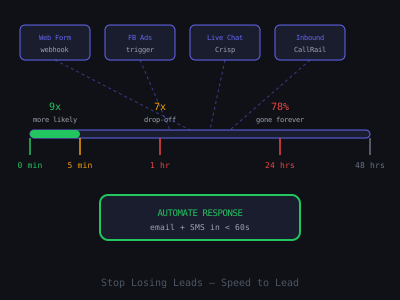
Research from the Harvard Business Review found that companies that respond to leads within one hour are seven times more likely to qualify them than those that wait just one more hour. And 78% of customers buy from the first business that responds to their inquiry. These numbers are not marginal improvements, they represent the difference between a thriving business and a struggling one.
Yet most businesses still rely on manual follow-up. Someone has to see the notification, open the CRM, find the lead, and write a response. In a busy workday, this takes 2–6 hours. By then, the lead has moved on. This guide shows you exactly how to build the automation that ends this problem permanently.
Think about it from the lead's perspective. They just searched for a solution, found your website, and filled out a form or made a call. In that moment, their intent is at its peak. They are actively comparing options, often with multiple browser tabs open. Every minute that passes without a response is a minute they spend engaging with your competitors. By the time you get around to calling them back the next morning, they have already spoken with two other providers and may have already signed a contract.
The speed-to-lead problem is not a discipline problem, it is a systems problem. No amount of training or reminders will fix it because the bottleneck is human capacity. The solution is to remove the human from the initial response entirely and let automation handle the first contact, the follow-up sequence, and the qualification process. A human only enters the picture when a lead is warm, engaged, and ready to talk. If you are building this as a service to sell to clients, see our guide on upselling clients on additional AI automations, lead follow-up is the most common entry point for expansion. For the cold outreach side, our cold email templates guide covers how to pitch this service effectively.
The Real Cost of Slow Follow-Up
Let's quantify it. A roofing company gets 80 leads per month. Their average close rate is 20% and average job is $8,000. That's $128,000/month in revenue. If slow follow-up costs them even 30% of those leads (a conservative estimate), they're losing $38,400 per month, or $460,000 per year, to delayed responses.
An automated follow-up system that costs $500/month to build and maintain would pay for itself 76 times over. This is the ROI argument that sells AI automation services to local and small businesses.
The math scales across every service industry. A dental practice generating 60 new patient inquiries per month with an average patient lifetime value of $3,200 is looking at $192,000 in monthly pipeline value. If 35% of those inquiries go cold because nobody called them back within the first hour, that is $67,200 per month walking out the door. A med spa with 40 leads per month at $1,500 per treatment package is bleeding $21,000 monthly from delayed follow-up alone.
The hidden cost goes deeper than just lost first appointments. Slow follow-up damages brand perception. A lead who waits six hours for a response subconsciously categorizes your client's business as disorganized and unresponsive. Even if they eventually book, they enter the relationship with lower trust and are more likely to price-shop or cancel. Fast responders, on the other hand, create an immediate impression of professionalism and attentiveness that carries through the entire customer lifecycle.
Why Manual Follow-Up Fails
Manual follow-up fails for predictable, structural reasons, not because your clients are lazy or careless:
- Notifications get missed, people are busy, on calls, with customers, or after hours
- No centralized inbox, leads come from 5+ different channels simultaneously
- No standardized process, every rep responds differently, with different quality
- After-hours gaps, 40% of web leads come in evenings and weekends
- Volume scaling, as leads increase, human capacity doesn't scale
There is a sixth failure mode that rarely gets discussed: cognitive load. A sales rep who handles 15 new leads per day alongside existing client work, appointments, and administrative tasks cannot give each lead the thoughtful, personalized attention it deserves. By the fifth or sixth lead of the day, responses become shorter, less personalized, and less persuasive. The quality of follow-up degrades in direct proportion to the volume of leads, which is exactly the opposite of what a growing business needs.
Automation eliminates every one of these failure modes. A machine doesn't get distracted, doesn't take weekends off, and responds to the 1,000th lead with the same speed and quality as the first. When you combine that consistency with AI-generated personalization, the automated response is often higher quality than what a rushed human would produce.
Lead Conversion Rate by Response Time
Relative likelihood of qualifying a lead, based on widely cited speed-to-lead research
The Fast Follow-Up Architecture
The system you need has five layers:
- Universal lead capture, all lead sources feed into one n8n workflow
- Instant response, automated email + SMS sent in under 60 seconds
- Multi-touch sequence, 5-step follow-up over 7 days
- Smart stop, sequence pauses the moment the lead replies
- Human handoff, qualified leads routed to sales rep with full context
Each layer solves a specific part of the problem. The universal capture eliminates the fragmented inbox issue. The instant response guarantees you are always the first to make contact. The multi-touch sequence ensures leads who do not respond immediately still get nurtured. The smart stop prevents the embarrassing scenario of sending a follow-up to someone who already replied. And the human handoff ensures that when a lead is ready to talk, a real person with full context takes over for the close.
The entire system runs inside a single n8n workflow. There are no external schedulers, no cron jobs, no manual intervention points. Once the workflow is activated, it handles every lead from first contact through handoff without any human involvement.
Step 1: Consolidate All Lead Sources
The first step is getting all lead sources into n8n. Add separate trigger nodes for each channel:
- Website form, Webhook trigger
- Facebook Ads, Facebook Lead Ads trigger
- Google Ads, conversion webhook
- Inbound calls, CallRail webhook when a call is received
- Live chat, Crisp or Intercom webhook on new conversation
- Email inquiries, Gmail trigger filtered to contact@domain.com
Use a Merge node to normalize each trigger into a consistent lead object with fields: name, email, phone, source, message, timestamp. This unified format feeds into a single response workflow regardless of origin.
The normalization step is critical and often overlooked. Facebook Lead Ads return data in a different structure than a website form webhook. A CallRail webhook includes a phone number but may not have an email. Your merge logic needs to handle these variations gracefully. Build a Function node after each trigger that maps the source-specific fields to your standard schema. For missing fields, like an email address on a phone-only lead, set a flag that tells the downstream workflow to skip the email branch and send only SMS.
Also add a deduplication check at this stage. Query your CRM or Airtable to see if this email or phone number already exists. If the lead is a repeat inquiry, skip the welcome sequence and instead send a different message acknowledging their return. Something like: "Welcome back, we noticed you reached out before. Would you like to pick up where we left off?" This prevents the awkward situation where a lead receives the same introductory sequence twice and signals to the prospect that the business is paying attention.
Step 2: Send the Instant Response
The moment a lead enters n8n, two things happen simultaneously using parallel branches:
- Email branch, Gmail node sends a personalized email using GPT-4o to write the message body. The email acknowledges their inquiry, confirms receipt, and includes a direct calendar link.
- SMS branch, Twilio node sends a short text: "Hi [Name]! We got your message and are reaching out now. Check your email for details, [Business Name]"
Both go out within 30–60 seconds of the lead submitting their inquiry. The double-channel approach ensures maximum visibility regardless of which channel the lead prefers.
The AI prompt for the instant response email is where the personalization happens. Pass the lead's message, the source they came from, and the client's business context into GPT-4o with a system prompt that includes the business name, services offered, pricing ranges, service area, and unique selling points. The AI uses this context to generate a response that directly addresses what the lead asked about. If someone inquired about roof replacement, the response talks about roof replacement, not a generic "thanks for reaching out."
Here is the structure for the system prompt you should use: Start with the business identity and what they do. List their primary services with brief descriptions. Include their service area and any relevant credentials or guarantees. Add their calendar booking link. Then provide instructions to the AI: write a warm, professional response under 150 words that acknowledges exactly what the lead asked about, mentions one relevant credential or differentiator, and ends with a clear call to action to book a call or reply with questions. Tell the AI to avoid sounding robotic or overly formal, the tone should match a helpful human who happens to respond very quickly.
Step 3: Build the 5-Touch Follow-Up Sequence
Most leads need 5–7 touchpoints before they respond. If you want a copy starting point for the cadence, our follow-up sequence generator drafts the multi-touch messages you then wire into n8n. Build the full sequence in n8n using chained Wait nodes:
- Touch 1 (0 min), instant personalized response via email + SMS
- Touch 2 (4 hours), value-add email with relevant case study or result
- Touch 3 (Day 2), short SMS check-in: "Still interested in talking?"
- Touch 4 (Day 4), different angle email addressing common objections
- Touch 5 (Day 7), final breakup email: "I'll stop reaching out, but the door is open if the timing changes"
Each touch uses GPT-4o to write a slightly different message to avoid sounding repetitive. The five messages are generated in batch at the start of the sequence and stored in Airtable for the scheduled sends.
The batch generation approach is important for two reasons. First, it is faster and cheaper than calling the API five separate times over seven days. Second, it gives you the ability to review all five messages as a coherent narrative. Each touch should build on the previous one. Touch 2 introduces social proof. Touch 3 is a casual check-in that feels human. Touch 4 proactively addresses the most common reason people hesitate (usually price or timing). Touch 5 uses the breakup pattern, which counterintuitively generates some of the highest reply rates because it removes pressure and triggers loss aversion.
When generating the batch, use a single API call with a prompt that says: "Generate 5 follow-up messages for this lead. Message 1 is the instant response. Message 2 should share a relevant result or case study. Message 3 is a short casual SMS check-in under 30 words. Message 4 should address the objection of [common objection for this industry]. Message 5 is a friendly breakup message. Return them as a JSON array." Parse the response and store each message in the corresponding Airtable field for scheduled delivery.
Pay attention to the timing of each touch. The 4-hour gap for Touch 2 is intentional, it lands later the same day while the lead's inquiry is still fresh, but far enough apart that it does not feel aggressive. The Day 2 SMS is a channel switch that recaptures attention. By Day 4, if the lead has not responded to email or SMS, the objection-handling angle gives them a new reason to engage. And Day 7 is long enough that the breakup feels natural rather than premature.
Step 4: Build the Smart Stop
This is the most important piece. Before each scheduled touch is sent, check whether the lead has already replied. Add a Gmail node querying the inbox for messages from the lead's email address. If a reply exists, skip the scheduled touch and trigger the human handoff instead.
Also check for calendar bookings, if the lead booked a call, stop the sequence immediately and send a booking confirmation. Nothing kills trust faster than receiving a "just following up" email after you've already scheduled a call.
The smart stop logic should check three conditions before each touch fires. First, query Gmail for any reply from the lead's email address since the sequence started. Second, check the calendar (Google Calendar or Calendly via API) for any booking with that email address. Third, check the CRM for any status change, if a sales rep has manually moved the lead to "contacted" or "in conversation," the automated sequence should yield to the human.
Implement this as an IF node after each Wait node. The IF node checks all three conditions. If any return true, the workflow routes to the "stop" branch, which updates the Airtable record to mark the sequence as completed and logs the reason (replied, booked, or manually contacted). If all three return false, the workflow routes to the "continue" branch, which sends the next scheduled touch.
One edge case to handle: the lead replies but with something that is not a buying signal, for example, "unsubscribe" or "not interested." Add a quick classification step using GPT-4o that reads the reply and categorizes it as positive (interested, has questions), negative (not interested, unsubscribe), or neutral (out of office, unclear). Positive replies trigger the full human handoff. Negative replies stop the sequence and mark the lead as closed-lost. Neutral replies pause the sequence and alert the sales rep to make a judgment call.
Step 5: Human Handoff for Hot Leads
When a lead replies or books a call, trigger a Slack notification to the sales rep with the full conversation history, lead source, and a direct link to the CRM record. The AI system has done its job, now a human takes over for the final close conversation.
Include a briefing note from GPT: "This lead came from Facebook Ads, asked about [service], and replied after Touch 2. They mentioned [specific concern]. Recommend leading with [talking point]."
The quality of the handoff directly impacts the close rate. A sales rep who walks into a call armed with context, what the lead asked about, which messages they engaged with, what objections they might have, closes at a significantly higher rate than one who is calling a name and phone number with no background. Structure the Slack notification as a brief dossier: lead name, company (if B2B), source channel, original inquiry text, which touches were sent and opened, the reply content, and a one-sentence AI-generated recommendation for how to approach the conversation.
For teams using a CRM like HubSpot or Pipedrive, automatically create or update the contact record with all of this context. Attach the full email thread, log the SMS messages as activities, and set a task for the assigned sales rep with a due date of "today." This way, even if the rep does not see the Slack message immediately, the task appears in their CRM dashboard the next time they check.
Follow-Up Sequence, Where Replies Come From
Approximate share of total replies per touch, 70% of conversions come from Touches 2-5, not the first message
Results to Expect
Clients who implement this system typically see:
- 50–80% reduction in lead response time
- 20–40% increase in lead-to-consultation conversion rate
- 15–25% increase in closed deals within the first 90 days
- Near-elimination of "leads that fell through the cracks"
These results compound over time. The initial lift comes from simply responding faster. But the ongoing gains come from the multi-touch sequence converting leads who would have otherwise gone cold. In a typical deployment, Touch 1 converts about 30% of leads who will eventually respond. Touches 2 through 5 collectively capture another 40–50%. Without the sequence, those leads would have been written off as "bad leads" when in reality they just needed more touchpoints.
Track these metrics monthly for each client: average response time (should be under 60 seconds), sequence completion rate (what percentage of leads receive all 5 touches), reply rate by touch number (to identify which messages perform best), and overall lead-to-appointment conversion rate. Present these numbers in a monthly report to demonstrate ongoing value and justify your recurring fee.
For the next level, combine this with the 5-minute lead response system and AI pre-qualification for a complete lead management pipeline.
Selling This to Clients
This is one of the easiest automation systems to sell because the problem is so tangible. Ask the prospective client three questions:
- "How quickly do you respond to new leads right now?" (Most will say hours or days.)
- "How many leads did you get last month?" (Get a concrete number.)
- "What's the average value of a closed deal?" (Get a dollar figure.)
Then do the math in front of them. If they get 50 leads at $5,000 per deal with a 20% close rate, they are generating $50,000 per month. Research shows faster follow-up improves close rates by 20–40%. Even at the low end, a 25% close rate would generate $62,500, an additional $12,500 per month. Your $1,000 monthly fee has a 12.5x ROI.
Most business owners have never done this calculation. When you show them the math, the sale practically closes itself.
To make this even more compelling, offer a 30-day pilot. Set up the system for one lead source, typically their website contact form, and run it for 30 days. Track every lead that comes in, the response time, and the conversion rate. At the end of the pilot, present the data: "In the last 30 days, 47 leads came through your website form. Our system responded to every single one in under 45 seconds. 14 of those leads booked a consultation. Your previous response time was averaging 4.5 hours, and your booking rate was around 15%. We moved it to 30%. That is 7 additional consultations this month." Data-driven proof from their own business is the strongest possible close.
Implementation Checklist
Use this checklist when building the system for a new client:
- Identify all lead sources (forms, calls, emails, ads) and set up triggers for each
- Collect the client's business description, services, pricing, and unique selling points for the AI prompt
- Configure email sending credentials (Gmail OAuth or SMTP with SPF/DKIM records verified)
- Set up Twilio for SMS with a local phone number in the client's area code
- Connect to the CRM (HubSpot, Pipedrive, or Google Sheets as a lightweight alternative)
- Configure Slack or email notifications for the sales team
- Build and test the 5-touch sequence with sample leads
- Test the smart stop logic to verify it catches replies and bookings correctly
- Set up error handling and monitoring alerts
- Record a Loom walkthrough for the client showing the system in action
A few additional items that will save you headaches. Before going live, send at least 5 test leads through the entire sequence from start to finish. Use different email addresses to simulate different scenarios: one that replies after Touch 1, one that books a call after Touch 3, one that says "not interested" after Touch 2, one that never responds, and one duplicate lead to test your deduplication logic. Verify that each scenario produces the correct behavior. This test run takes about 30 minutes and prevents the vast majority of post-launch issues.
Also set up an error notification workflow. If any node in the sequence fails, a Gmail send that bounces, a Twilio SMS that returns an error, or an API call that times out, you need to know immediately. Add an Error Trigger node in n8n that sends you a Slack DM with the error details, the lead's information, and the step that failed. This lets you fix issues before the client even notices them and demonstrates the kind of proactive service that earns long-term retainer clients.
Ongoing Optimization
The initial build gets you 80% of the results. The remaining 20% comes from ongoing optimization:
- A/B test subject lines: Generate two variants for each touch and alternate between them. Track open rates to identify winners.
- Optimize timing: Test different delay intervals between touches. Some industries respond better to more aggressive follow-up while others prefer longer gaps.
- Refine AI prompts: Review the AI-generated messages monthly. Identify phrases that get more replies and incorporate them into the system prompt.
- Add channels: After email and SMS are running, consider adding LinkedIn connection requests or voicemail drops via a service like Slybroadcast for additional touchpoints.
- Segment by source: Create different follow-up sequences for different lead sources. A Facebook ad lead may need different messaging than a Google search lead.
Source segmentation deserves special attention because it has an outsized impact on conversion rates. A lead from Google Search has high intent, they were actively looking for the service. Your follow-up should be direct and assume interest. A lead from a Facebook Ad has lower intent, they were scrolling and something caught their eye. Your follow-up needs to re-establish the problem and build the case for why they should act now. A referral lead already has trust built in, so your follow-up should leverage the referrer's name and skip the credibility-building touches.
Build separate sequence templates for each source type. The structure stays the same, 5 touches over 7 days with smart stop logic, but the messaging and tone shift based on the lead's likely mindset when they entered the funnel. This level of sophistication is rare among small businesses and creates a meaningful competitive advantage for your clients.
Finally, schedule a monthly optimization review with your client. Pull the data, show them what is working, and propose one or two changes for the next month. This recurring touchpoint justifies your retainer, surfaces upsell opportunities (like adding a new lead source or building a re-engagement sequence for old leads), and demonstrates that you are actively managing and improving the system rather than setting it and forgetting it.
Get the Free Template
The complete n8n workflow template for this build is available for free inside our community. Download it and have this running for a client in under an hour.
Join Kingstone AI Operators, free, to access all templates.
Want to learn how to build and sell AI automations? Kingstone AI Operators is our free community for AI automation agency builders. Join Kingstone AI Operators, free.
FAQ
Frequently Asked Questions
Why am I losing leads from slow follow-up?
Research shows 78 percent of customers buy from the first business that responds. Companies responding within one hour are 7x more likely to qualify leads than those waiting two hours. Most businesses take hours or days to respond, meaning they lose the majority of their leads to faster competitors before ever making contact.
How do I build an automated lead follow-up system?
Set up real-time triggers in n8n for each lead source. Route leads through an OpenAI node for personalized response generation. Send an email and SMS within 60 seconds of the inquiry. Build a 5-touch follow-up sequence with Wait nodes at 4 hours, day 2, day 4, and day 7. Add smart stop logic that checks for replies before each scheduled touch.
How many follow-up touchpoints should I send to new leads?
Most leads need 5 to 7 touchpoints before they respond. A proven sequence is an instant personalized response, a value-add email at 4 hours, a short SMS check-in at day 2, an objection-handling email at day 4, and a breakup email at day 7. Each touch should offer a different angle to avoid sounding repetitive.
How do I stop the follow-up sequence when a lead replies?
Before each scheduled touch, add a check that queries Gmail or your CRM for replies from the lead's email address. If a reply exists, skip the remaining touches and trigger a human handoff notification instead. Also check for calendar bookings to stop the sequence if the lead has already scheduled a call.
How much revenue does faster lead follow-up generate?
Clients who implement automated sub-5-minute response systems typically see a 20 to 40 percent increase in lead-to-consultation conversion rate and a 15 to 25 percent increase in closed deals within 90 days. For a business closing $5,000 deals with 50 leads per month, even a 10 percent improvement adds $25,000 per month in revenue.
Should I use email or SMS for automated lead follow-up?
Use both channels simultaneously. SMS has a 98 percent open rate compared to 20 percent for email, so it virtually guarantees the lead sees your response. The email contains the full detailed response with booking links, while the SMS is a short confirmation directing them to check their email. The dual-channel approach maximizes visibility.
How do I personalize automated follow-up emails with AI?
Pass the lead's inquiry details, company name, industry, and lead source to GPT-4o with a system prompt containing business context and response guidelines. The AI generates unique, contextually relevant messages for each touch in the sequence. Generate all 5 messages upfront and store them for scheduled delivery so each feels fresh and different.
What is the best tool for building automated lead follow-up?
n8n is the best tool for AI agencies because it supports real-time webhook triggers, native OpenAI integration for AI-powered personalization, Wait nodes for timed sequences, and integrations with Gmail, Twilio, HubSpot, and Slack. It handles the full follow-up lifecycle from instant response to human handoff in a single visual workflow.
Program · 90 days
Client Accelerator bundles the demo software with live coaching.
A one-time $1,499 purchase, or 4 interest-free payments of $374.75. Includes Ciela AI with 150 personalized demos each month throughout the program, the 90-Day AI Client System, two live group coaching calls every week, sales and outreach templates, 200+ n8n workflow templates, and private Build With Adhiraj resources.
See what is includedCiela AI is the demo platform for AI agencies and AI consultants. It turns any prospect's website into a live, personalized AI demo (chat, voice, or missed-call text-back) you can send before the first call.
Start Client AcceleratorCiela AI pricingAgent builds by nicheAll articles
Community · Training
Join Build With Adhiraj free.
Build With Adhiraj is the free community for people building and growing AI service businesses. Learn alongside other operators as you package, demonstrate, sell, and deliver practical AI systems.
Join Build With Adhiraj free